Dizzion Support
How you will find e.g. Contact Support, Release Stages, EOM and EOL, Support Guide and Platform Status
- Contact Support
- Dizzion Product Release stages
- End of Maintenance (EOM) and End of Life (EOL) Components
- Official Dizzion Support Guide
- Platform Status
Contact Support
If you are experiencing issues with your Dizzion environment (Frame or VMware Horizon) or simply have a question, it is easy to contact our support team. Customers may create support tickets through our Support Portal which helps to ensure that communications are accurate and reliable, as some issues may require extensive investigation by support personnel. Follow the steps below to create a support case.
1. Access Dizzion Support
Start by opening your preferred web browser and navigating to the Dizzion Support Portal. Click the Sign In button in the upper right corner of the page, where you'll be asked to authenticate. From there, enter your credentials.
Enter your C3 login credentials (email address and password), and then click the Sign In button to access your Frame Support account.
You should receive an email from ProvisioningCenter@dizzion.com as outlined in the support migration announcement. The email will look like this:
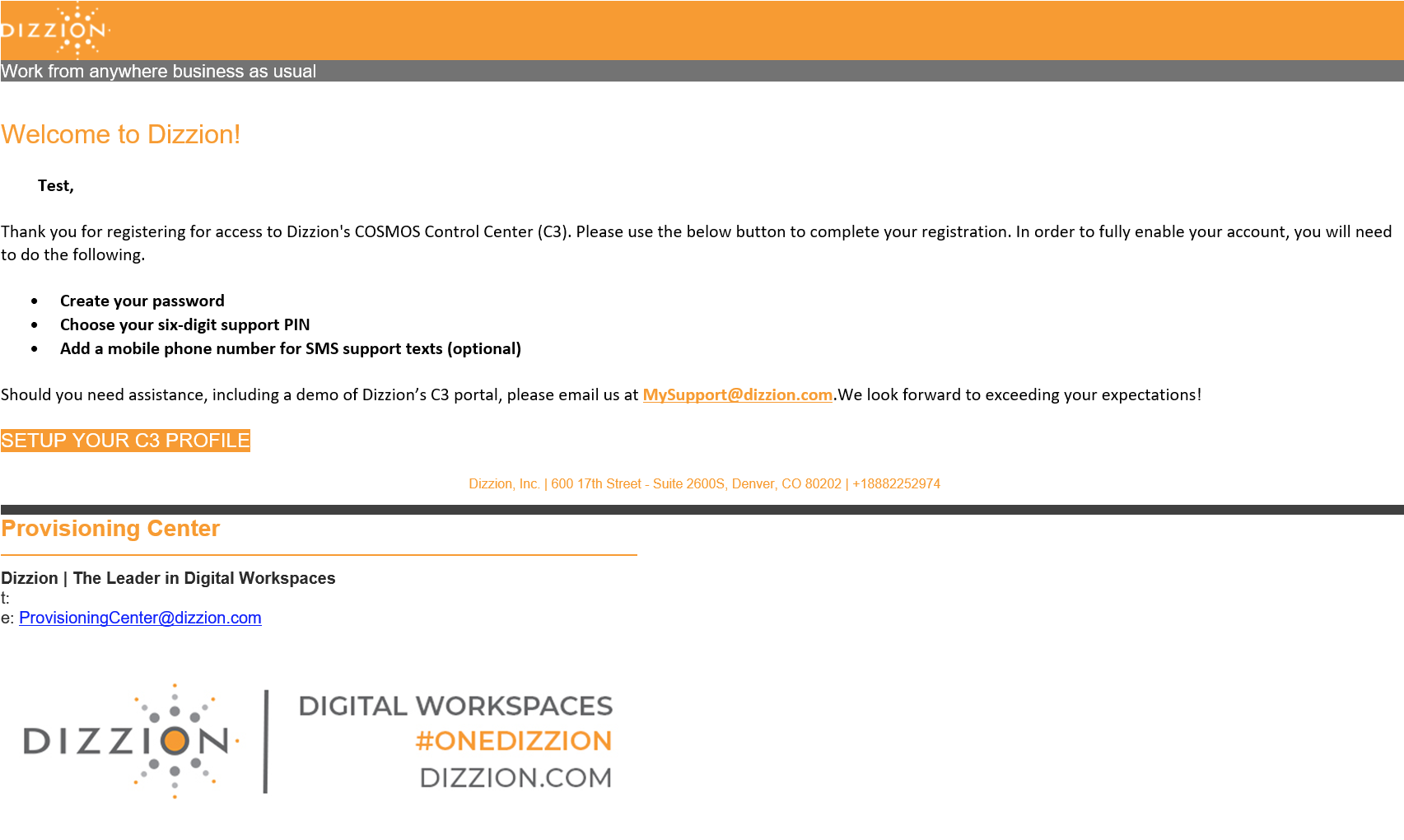
Simply click on the "Setup your C3 Profile" link button and go through the sign up process.
If you have not received this email, please contact your CSM or email us at frameonboarding@dizzion.com.
2. Navigate to the Service Request Creation Page
Once logged in, you will land on the Dizzion Support dashboard. Find and click on the Submit a Request button located in the top navigation menu.
3. Start Creating a Service Request
On the Service Request page, complete the form by selecting the product category:
Frame
or
Horizon
4. Fill in Service Request Details:
In the service request creation form, provide the necessary information:
- Subject: Write a concise and descriptive summary of the request.
- Issue Type: What type of issue do you need help with?
- Priority: What is the urgency of your request? Full descriptions of each priority level are listed below.
- Cloud Provider: What infrastructure are you running Frame on?
- Description: Elaborate on the request, providing any relevant details such as error messages, steps to reproduce the issue, and/or any additional context.
5. Add Attachments (if needed)
Be sure to add any relevant files or screenshots that could help clarify the request. From there, click on the Attachments button to upload them or drag and drop them in the designated area.
6. Submit the Ticket
After entering all required details, click the Submit button to create the service request.
7. Confirmation and Ticket Tracking
After you submit it, you will receive a confirmation message or email with the ticket details, including a unique ticket number. Take note of the ticket number for future reference.
You can track the progress of your request from the Dizzion support dashboard. The assigned engineer will be notified to begin addressing the request.
View your Support Requests: Click the Requests button in the top navigation menu to view your support requests.
Definitions of Priority Level and Targeted Initial Response
| Priority Level | Description | Target Initial Support Response |
|---|---|---|
| P1 | Emergency: Dizzion Platform services for a Production Dizzion account are completely unreachable, affecting all end users of the applications/desktops hosted by that account and/or affecting all administrators of an account. | Within 1 hour |
| P2 | Critical: Dizzion Platform services are available but experiencing issues that directly impact productivity. Some (but not all) end-users of an application on a Production account cannot reach the application or desktop, and/or some (but not all) administrators cannot reach the Dizzion Console. No workaround is available. Major inconvenience. | Within 4 hours |
| P3 | Normal: Some end user sessions are experiencing degraded performance, and/or some administrator Dizzion Console features are not functioning as expected. | Next business day (NBD) |
| P4 | Low: Questions about documentation, processes, or procedures. General requests about information. General questions on configuration, setup, application issues, and compatibility. | By the next 2 business days (N2BD) |
| RFE | Requests for Enhancements: Feature requests for the product that would improve the experience or functionality for the customer. | Within 2 weeks |
If you would like more information about Frame's SLA response times, please refer to the official Frame Support Guide listed above.
Dizzion Product Release stages
| Release Stage | Readiness | Accessibility | Usability | Public Documentation | Support |
|---|---|---|---|---|---|
| Tech Preview | Ready for qualified Proof of Concept (PoC) deployments. | Requires some assistance or special configuration to enable. | Basic functionality is available but may be limited. Usability may vary, and features are subject to change based on early user feedback. | Public documentation is rarely available. | Limited Support - Limited assistance from Dizzion Solutions Architecture & Engineering may be available with no formal SLAs. |
| Early Access (EA) | Ready for pilot deployments. | Self-service. Can be enabled from the UI by most customers. | Usable for most deployments with a majority of core features in place. Some functionality may still be evolving, and user experience may be refined prior to GA. | Public documentation may not be complete or available. | Limited Support - Customers may receive assistance from Dizzion Solutions Architecture & Engineering with no formal SLAs. |
| Generally Available (GA) | Ready for production deployments. | Self-service. Can be enabled from the UI by any customer. | Fully usable with all intended features available. Designed for production deployments with a polished and stable user experience. | Public documentation is available. | Officially Supported - Support with standard Dizzion Support SLAs. |
| End of Maintenance (EOM) | Safe for production deployments but should be migrated to a supported version as soon as possible. | May no longer be available or accessible. | Generally usable at GA level, but no new enhancements or improvements will be made.* | Public documentation remains available but is de-prioritized, with EOM warnings included. | Limited Support - Issues specific to EOM components will not be addressed. Limited assistance may be available for general inquiries, but no fixes or updates are provided. Upgrading to a supported version will be the recommended solution for any issues related to EOM components.* |
| End of Life (EOL) | Cannot be used for any deployment. | May no longer be accessible or usable. | Should no longer be used as the product is fully deprecated and should be replaced with a supported version. | Public documentation may be archived or removed. | Not Supported - No longer supported by Dizzion. |
* = End of Maintenance (EOM) signifies that a component or service will no longer receive updates, patches, or new features from Dizzion. While EOM components remain functional, they may become vulnerable to security risks, compatibility issues, and performance degradation over time. Customers are strongly advised to migrate to a supported version promptly to maintain optimal functionality and security.
End of Maintenance (EOM) and End of Life (EOL) Components
Once a component or feature reaches End of Maintenance (EOM) status, it will remain accessible and functional but will no longer receive updates or active support from Dizzion. Customers are encouraged to migrate to a supported version as soon as possible. Documentation will still be available but will be de-prioritized in favor of newer version information, with clear warnings indicating the EOM status.
When a component or feature reaches End of Life (EOL) status, it will no longer be supported or maintained by Dizzion. EOL components or features may become inoperative or completely inaccessible within the Frame tenant or Horizon environment. Customers are responsible for discontinuing the use of these components or features before the designated EOL date.
All End of Maintenance (EOM) and End of Life (EOL) dates for key Frame components and features are posted below. Please note that these dates are subject to change at any time.
| Name | Version | Infrastructure | End of Maintenance | End of Life | Details |
|---|---|---|---|---|---|
| Frame Launchpad | Legacy | - | 06/30/2025 | The new Launchpad experience will be deployed in two waves on May 18, 2025 and June 1, 2025 as part of our scheduled platform releases. | |
| Streaming Gateway (SGA) 3 | 3.5 | 12/31/2024 | TBA | ||
| Windows Server | 2019 | 04/19/2025 | 07/31/2025 | ||
| Liquidware Driver | 6.8.5 | - | TBA | Build 8444, Released 3/20/2023 | |
| Frame App 7 | 7.7 | 09/30/2025 | 03/31/2026 | ||
| Frame App 7 | 7.6 | 03/31/2025 | 09/30/2025 | ||
| Frame App 7 | 7.5 | 01/31/2025 | 07/31/2025 | ||
| My Nutanix Authentication | - | 03/31/2025 | Nutanix customers will no longer be able to access Frame with My Nutanix credentials | ||
| Frame App 7 | 7.4 | 6/30/2024 | 12/31/2024 | ||
| Liquidware Driver | 6.8.4 | - | 09/28/2024 | Build 8088, Released 3/4/2022 | |
| Frame Remoting Protocol (FRP) 7 | 7 | - | 06/30/2024 | ||
| Frame App 6 | 6.16 | - | 06/30/2024 | Released 12/8/2022 | |
| Streaming Gateway (SGA) 3 | 3.4 | - | 06/30/2023 | ||
| Frame App 6 | 6.15 | - | 03/31/2023 | Released 11/10/2022 | |
| Quick Launch Feature | - | 01/31/2023 | |||
| Liquidware Driver | 6.8.4 | - | 09/30/2022 | Build 7697, Released 2/11/2021 | |
| Google Drive Storage Connector | - | 07/31/2022 | |||
| OneDrive Cloud Storage Connector | - | 07/31/2022 | |||
| Box Cloud Storage Connector | - | 06/30/2022 | |||
| Dropbox Cloud Storage Connector | - | 06/30/2022 | |||
| Frame Guest Agent | 7.x | - | 01/31/2022 | ||
| Basic Profiles | AWS | - | 01/31/2022 | ||
| Windows Server | 2016 | - | 01/31/2022 | ||
| Windows Server | 2012 R2 | - | 01/31/2022 | ||
| CentOS | 7 | - | 01/31/2022 | ||
| Ubuntu | 18.04 | - | 01/31/2022 | ||
| Liquidware Driver | 6.8.3 | - | 06/30/2021 | Build 7618, Released 11/19/2020 | |
| Liquidware Driver | 6.8.3 | - | 06/30/2021 | Build 7587, Released 10/12/2020 | |
| Liquidware Driver | 6.8.3 | - | 12/31/2020 | Build 7541, Released 8/25/2020 | |
| Liquidware Driver | 6.8.3 | - | 12/31/2020 | Build 7516, Released 7/31/2020 | |
| Liquidware Driver | 6.8.3 | - | 12/31/2020 | Build 7453, Released 5/29/2020 | |
| Cloud Connector Appliance (CCA) | 2.x | Nutanix AHV | - | 10/31/2020 | |
| Liquidware Driver | 6.8.3 | - | 06/30/2020 | Build 7404, Released 12/09/2019 |
Official Dizzion Support Guide
Introduction
Highlights
- Worldwide support centers
- Dizzion Support Portal for proactive support and the latest information on our products, knowledge base articles, documentation, downloads, and FAQs.
- State-of-the-art reproduction labs in all major geographies for the quick and efficient turnaround of support requests
Dizzion Support Locations
- Multiple Locations in the US
- Belgrade, Serbia
- Americas: North America, Latin America, and the Caribbean
- EMEA: Europe, the Middle East, and Africa
- APJ: Asia Pacific Japan
Note: Customers are supported based on the organization's geographic location on record. Please review the Support Program section for details on Business Hours and 24/7/365 Support.
Support Program
Features
- Online resources: Dizzion’s Support Portal offers extensive product documentation, access to software, patches, a knowledge base, unprecedented search capabilities, and other helpful information. Customers can create cases at any time by visiting the support website at support.dizzion.com and entering a new case. If you require a support account, please self-register at portal.nutanix.com.
- Software subscription: The customer is entitled to all platform updates, including major releases, minor releases, bug fixes, and patches issued during the period their subscription is in effect. Customers with a current subscription will be alerted to new releases and can download them from a location provided by Dizzion Support. Please refer to the Software End of Life (EOL) Policy for more details.
24/7/365 Support
Note: Priority is determined jointly by the customer and Dizzion. For more information on Priority Levels, see the Initial Response Definition section.
Business Hours
Understanding Case Priorities
Priority Level and Targeted Initial Response Definitions
|
Priority Level |
Description |
Target Initial Support Response |
|
P1 |
Emergency: Dizzion Platform services for a Production Dizzion account are completely unreachable, affecting all end-users of the applications/desktops hosted by that account and/or all administrators of the account. |
Within 1 hour |
|
P2 |
Critical: Dizzion Platform services are available but are experiencing issues that directly impact productivity. Some (but not all) end-users of an application on a Production account cannot reach the application or desktop, and/or some (but not all) administrators cannot reach the Dizzion Console. No workaround is available. Major inconvenience. |
Within 4 hours |
|
P3 |
Normal: Some end-user sessions are experiencing degraded performance, and/or some administrator Dizzion Console features are not functioning as expected.
|
Next Business Day (NBD) |
|
P4 |
Low: Questions about documentation, processes, or procedures. General requests for information.
General questions on configuration, setup, application issues, and compatibility. |
By the next two business days (N2BD) |
|
RFE |
Requests for Enhancements: Feature requests for the product that aim to improve the customer's experience or functionality. |
Within 2 weeks |
Dizzion Team Roles and Responsibilities
- Responding to support cases
- Recreating customer issues
- Researching, identifying, and resolving technical product issues
- Working with cross-functional teams within Dizzion to resolve issues
- Documenting case notes accurately and developing solutions for the knowledge base
Support Case Life Cycle
- Collect information to troubleshoot the problem, including the Dizzion account name, the user or administrator who experienced the issue, the time of the issue, logs, error messages, and all other relevant information.
- Create a Support Case
- Work with the Platform Support Engineer (PSE) to investigate the issue and determine its root cause.
- Resolve and close the Support Case.
Collecting Information to Troubleshoot Your Problem
- Detailed description of the issue
- Dizzion Account Name
- Name(s) of user(s) experiencing the issue
- What infrastructure are you using?
- The time at which the issue occurred
- If the issue is related to an end-user's access or use of their Dizzion session, please provide the session ID(s) for the session(s) where the issue occurred.
- Can you reproduce the issue? If so, please provide the exact steps for us to reproduce the issue.
- Steps taken thus far in remediation.
Creating a Support Case
When opening a case, it is important to select the correct product when creating a support case to ensure your case is routed to the right team. The required fields are self-explanatory. The fields "Priority" and "Issue Type" have pulldown menus. The Subject and Description fields define the problem. Please describe the issue in as much detail as possible. Doing so helps us determine if a known document can help immediately, and if not, allows the PSE to perform initial troubleshooting and research before initiating contact. Use the Priority field to ensure a timely response and to set our expectations about the issue’s impact.

Working the Issue
- Asking you for more information.
- Asking you to install specific software or patches.
- Asking for specific debug data from your machine.
- Trying to reproduce the problem in our test environments.
- Verifying software bugs with our engineering team.
- Asking you to implement and test workaround suggestions that may avoid the problem.
- Asking you to involve your staff to help troubleshoot.
- Working with you to involve relevant third-party software or hardware vendors.
Closing a Support Case
Supported Versions
Note: In many situations, if you are on the previous to the current release, you will be required to upgrade to the current version of the component or driver before Support can assist you further, as the issue may have been addressed in the latest release.
End of Life Policy
Platform Status
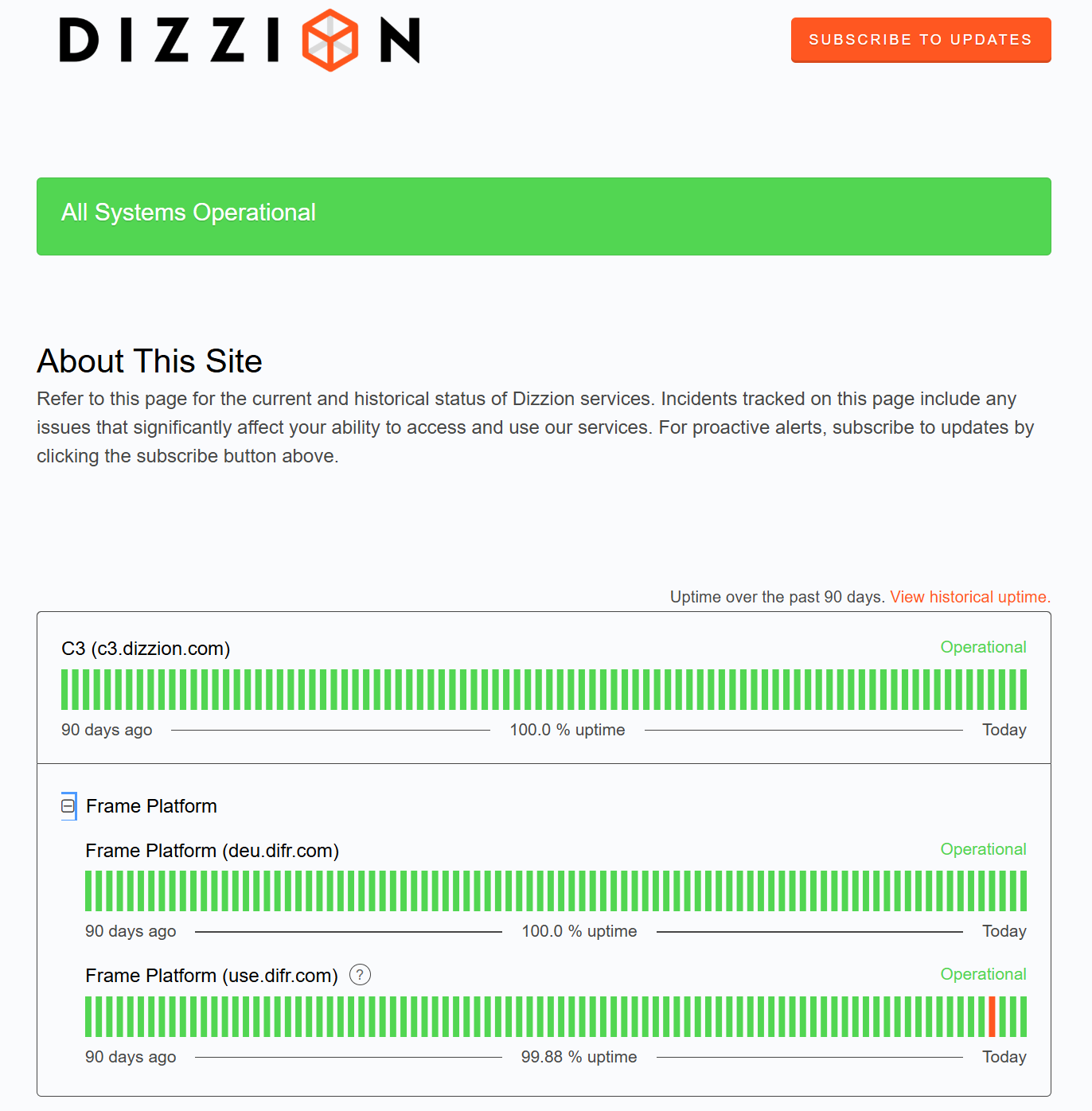
You can check the status of the Frame Platform service at any time by visiting status.dizzion.com
You can also subscribe to email and/or text message updates on scheduled maintenance and other events by clicking on the Subscribe to Updates button at the top right of the page. The status page also features a list of past incidents with timestamps and descriptions for the events.