# Register Workloads (Early Access)

# Overview

<span style="font-family: 'Aptos Display',sans-serif; mso-ascii-theme-font: major-latin; mso-hansi-theme-font: major-latin;">The **Register Workloads feature** lets customers bring existing virtual machines or workloads into the Dizzion Frame platform as persistent desktops without recreating or migrating resources. It supports all Dizzion-approved infrastructures including AWS, Azure, Google Cloud, IBM Cloud, and Nutanix AHV. This feature is ideal for migration scenarios from e.g. Citrix, Microsoft, or Omnissa, enabling smooth A/B and acceptance testing alongside existing environments.</span>

## Prerequisites

<span style="font-family: 'Aptos Display',sans-serif; mso-ascii-theme-font: major-latin; mso-hansi-theme-font: major-latin;">Before registering workloads, ensure the following:</span>

1. <span style="font-family: 'Aptos Display',sans-serif; mso-ascii-theme-font: major-latin; mso-hansi-theme-font: major-latin;">The cloud account containing the workloads has been imported into Frame using the standard cloud account creation procedure. See: </span>[<span style="font-family: 'Aptos Display',sans-serif; mso-ascii-theme-font: major-latin; mso-hansi-theme-font: major-latin;">Add Cloud Account</span>](https://docs.difr.com/books/platform-administrators-guide/page/bring-your-own)<span style="font-family: 'Aptos Display',sans-serif; mso-ascii-theme-font: major-latin; mso-hansi-theme-font: major-latin;"> for more information.</span>
2. <span style="font-family: 'Aptos Display',sans-serif; mso-ascii-theme-font: major-latin; mso-hansi-theme-font: major-latin;">This feature only works for Windows Operating Systems </span>
3. <span style="font-family: 'Aptos Display',sans-serif; mso-ascii-theme-font: major-latin; mso-hansi-theme-font: major-latin;">The workloads are accessible over the network and can be reached using VNC, Microsoft RDP, Citrix HDX, Omnissa (VMware) Blast, or any other supported connection protocol.</span>
4. <span style="font-family: 'Aptos Display',sans-serif; mso-ascii-theme-font: major-latin; mso-hansi-theme-font: major-latin;">For manual installation, you need administrative privileges on the workload VMs to install the Frame Guest Agent. For unattended installation, make sure the Frame Agent Setup Tool (FAST) is downloaded and setup for automated installation. </span><span style="mso-comment-continuation: 4;"><span style="mso-comment-continuation: 3;"><span style="mso-comment-continuation: 2;"><span class="MsoCommentReference"><span style="font-size: 8.0pt; line-height: 115%; font-family: 'Aptos Display',sans-serif; mso-ascii-theme-font: major-latin; mso-hansi-theme-font: major-latin;"></span></span></span></span></span>
5. <span style="font-family: 'Aptos Display',sans-serif; mso-ascii-theme-font: major-latin; mso-hansi-theme-font: major-latin;">Workloads must have outbound network connectivity on TCP port 443 (HTTPS) to access the registration URL, which is provided in the setup instructions below.</span>
6. <span style="font-family: 'Aptos Display',sans-serif; mso-ascii-theme-font: major-latin; mso-hansi-theme-font: major-latin;">All networking requirements must be met as described in the reference documentation </span>[<span style="font-family: 'Aptos Display',sans-serif; mso-ascii-theme-font: major-latin; mso-hansi-theme-font: major-latin;">here</span>](https://docs.difr.com/books/platform-administrators-guide/page/requirements)<span style="font-family: 'Aptos Display',sans-serif; mso-ascii-theme-font: major-latin; mso-hansi-theme-font: major-latin;"> .</span>

## Workflow:

## Step 1. – Create a Persistent Desktop Account

<span style="font-family: Symbol; mso-fareast-font-family: Symbol; mso-bidi-font-family: Symbol;"><span style="mso-list: Ignore;">·<span style="font: 7.0pt 'Times New Roman';"> </span></span></span><span style="font-family: 'Aptos Display',sans-serif; mso-ascii-theme-font: major-latin; mso-hansi-theme-font: major-latin;">Here are more details about </span>[<span style="font-family: 'Aptos Display',sans-serif; mso-ascii-theme-font: major-latin; mso-hansi-theme-font: major-latin;">Persistent Desktops</span>](https://docs.difr.com/books/platform-administrators-guide/page/persistent-desktops-administration)<span style="font-family: 'Aptos Display',sans-serif; mso-ascii-theme-font: major-latin; mso-hansi-theme-font: major-latin;"> </span>

## <span class="Heading2Char"><span style="font-size: 16.0pt; line-height: 115%;">Step 2 - Register Workloads from console by:</span></span>

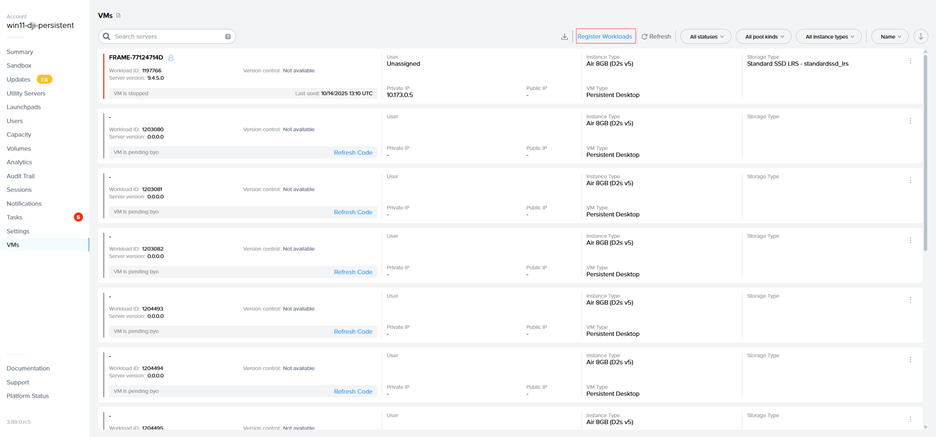
<span style="font-family: Symbol; mso-fareast-font-family: Symbol; mso-bidi-font-family: Symbol;"><span style="mso-list: Ignore;">·<span style="font: 7.0pt 'Times New Roman';"> </span></span></span><span style="font-family: 'Aptos Display',sans-serif; mso-ascii-theme-font: major-latin; mso-hansi-theme-font: major-latin;">Go to the VMs page and select the “Register Workloads.”</span>

<span style="font-family: 'Aptos Display',sans-serif; mso-ascii-theme-font: major-latin; mso-hansi-theme-font: major-latin; mso-no-proof: yes;">![A screenshot of a computer

AI-generated content may be incorrect.](https://docs.difr.com/uploads/images/gallery/2025-10/embedded-image-twbq0fe5.png)</span>

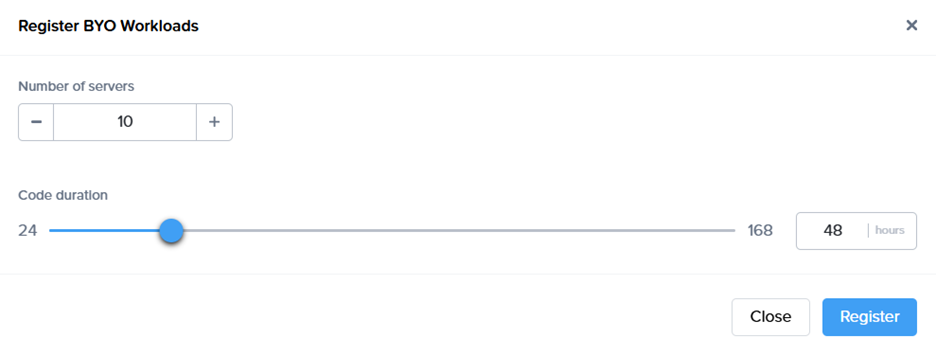
<span style="font-family: Symbol; mso-fareast-font-family: Symbol; mso-bidi-font-family: Symbol;"><span style="mso-list: Ignore;">·<span style="font: 7.0pt 'Times New Roman';"> </span></span></span><span style="font-family: 'Aptos Display',sans-serif; mso-ascii-theme-font: major-latin; mso-hansi-theme-font: major-latin;">Specify the number of workloads you want to import into a persistent desktop pool.</span>

<span style="font-family: 'Aptos Display',sans-serif; mso-ascii-theme-font: major-latin; mso-hansi-theme-font: major-latin; mso-no-proof: yes;">![A white rectangular object with a black line

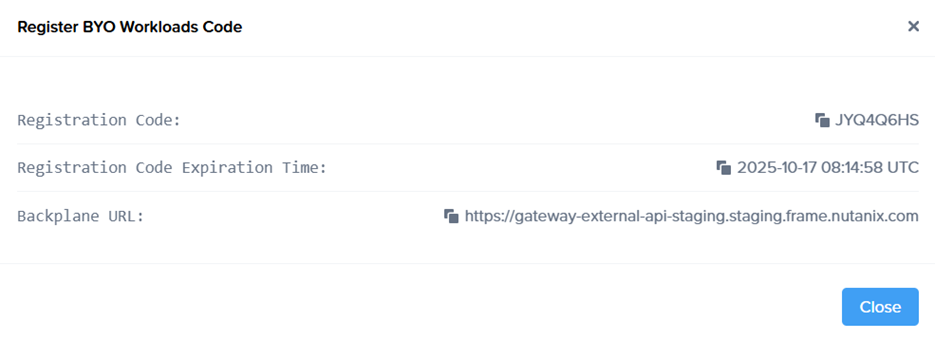
AI-generated content may be incorrect.](https://docs.difr.com/uploads/images/gallery/2025-10/embedded-image-m3pzxk3p.png)</span><span style="font-family: 'Aptos Display',sans-serif; mso-ascii-theme-font: major-latin; mso-hansi-theme-font: major-latin;">a registration code with an expiration time, along with the backplane URL will be displayed.</span>

<span style="font-family: 'Aptos Display',sans-serif; mso-ascii-theme-font: major-latin; mso-hansi-theme-font: major-latin; mso-no-proof: yes;">![A screenshot of a computer

AI-generated content may be incorrect.](https://docs.difr.com/uploads/images/gallery/2025-10/embedded-image-vq64imdd.png)</span>

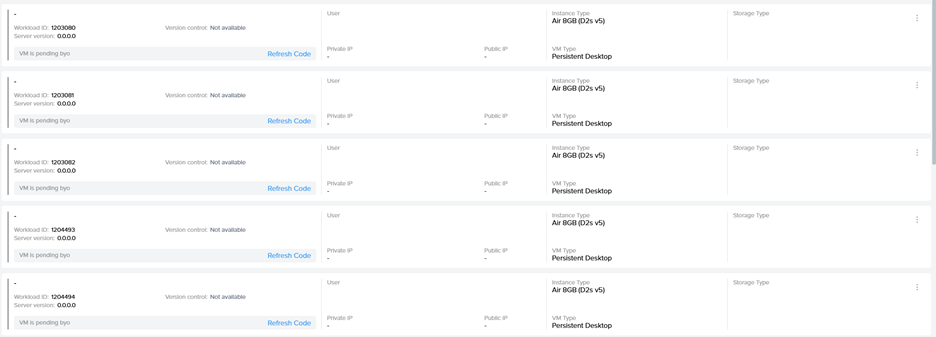
<span style="font-family: Symbol; mso-fareast-font-family: Symbol; mso-bidi-font-family: Symbol;"><span style="mso-list: Ignore;">·<span style="font: 7.0pt 'Times New Roman';"> </span></span></span><span style="font-family: 'Aptos Display',sans-serif; mso-ascii-theme-font: major-latin; mso-hansi-theme-font: major-latin;">New objects appear on the VMs page, serving as placeholders until the actual virtual machines register. If the registration code expires, refresh the page to generate a new one.<span style="mso-no-proof: yes;">![A screenshot of a computer
AI-generated content may be incorrect.](https://docs.difr.com/uploads/images/gallery/2025-10/embedded-image-hbjnedvs.png)</span></span>

## Step 3 - Install Frame Guest Agent on Workloads

#### <span style="font-family: 'Aptos Display',sans-serif; mso-ascii-theme-font: major-latin; mso-hansi-theme-font: major-latin;">Manual installation</span>

<span style="font-family: 'Aptos Display',sans-serif; mso-ascii-theme-font: major-latin; mso-hansi-theme-font: major-latin;">On each workload VM, connect using VNC, Microsoft RDP, Citrix HDX, Omnissa (VMware) Blast, or another preferred protocol, then run the Frame Agent Setup Tool (FAST) with the registration parameters. </span>

#### <span style="font-family: 'Aptos Display',sans-serif; mso-ascii-theme-font: major-latin; mso-hansi-theme-font: major-latin;">Download the installer, the Frame Agent Setup Tool (FAST)</span>

[https://files.difr.com/](https://files.difr.com/)<span style="font-family: 'Aptos Display',sans-serif; mso-ascii-theme-font: major-latin; mso-hansi-theme-font: major-latin;"> </span>

#### <span style="font-family: 'Aptos Display',sans-serif; mso-ascii-theme-font: major-latin; mso-hansi-theme-font: major-latin;">Run the registration command</span>

```
frameagentsetuptool.exe install frameimage registrationcode= registrationurl=<url>
```

<span style="font-family: 'Aptos Display',sans-serif; mso-ascii-theme-font: major-latin; mso-hansi-theme-font: major-latin;">Replace &lt;code&gt; and &lt;url&gt; with the values generated in Step 2 of the Workflow.</span>

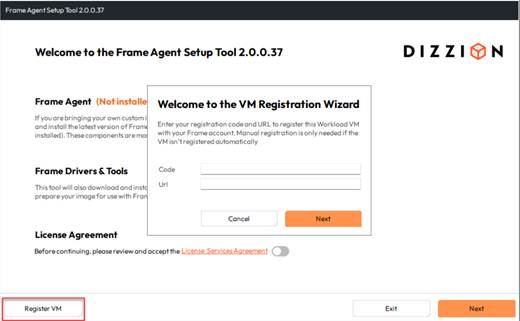
### Registration via UI:

<span style="mso-no-proof: yes;">![A screenshot of a computer

AI-generated content may be incorrect.](https://docs.difr.com/uploads/images/gallery/2025-10/embedded-image-lv7xgwe0.png)</span>

<span style="font-family: 'Aptos Display',sans-serif; mso-ascii-theme-font: major-latin; mso-hansi-theme-font: major-latin;">Use &lt;code&gt; and &lt;url&gt; with the values generated in Step 2 of the Workflow.</span>

### <span style="color: rgb(241, 196, 15);"><span style="font-family: 'Aptos Display',sans-serif; mso-ascii-theme-font: major-latin; mso-hansi-theme-font: major-latin;"> </span></span><span style="font-family: 'Aptos Display',sans-serif; mso-ascii-theme-font: major-latin; mso-hansi-theme-font: major-latin;">Unattended Installation</span>

<span style="font-family: 'Aptos Display',sans-serif; mso-ascii-theme-font: major-latin; mso-hansi-theme-font: major-latin;">For larger environments, the Frame Agent Setup Tool (FAST) can be deployed automatically using standard management tools.</span>

#### Recommended Methods

- <span style="font-family: 'Aptos Display',sans-serif; mso-ascii-theme-font: major-latin; mso-hansi-theme-font: major-latin;">PowerShell Script: Run locally or remotely or distribute via GPO.</span>
- <span style="font-family: 'Aptos Display',sans-serif; mso-ascii-theme-font: major-latin; mso-hansi-theme-font: major-latin;">Intune / Endpoint Manager: Package FAST as a Win32 app and assign to devices.</span>
- <span style="font-family: 'Aptos Display',sans-serif; mso-ascii-theme-font: major-latin; mso-hansi-theme-font: major-latin;">Cloud Startup Scripts: Add the command to Azure Custom Script, AWS User Data, or GCP startup metadata for automatic registration at boot.</span>
- <span style="font-family: 'Aptos Display',sans-serif; mso-ascii-theme-font: major-latin; mso-hansi-theme-font: major-latin;">Use any third-party deployment tool of your choice.</span>

#### Tips

- <span style="font-family: 'Aptos Display',sans-serif; mso-ascii-theme-font: major-latin; mso-hansi-theme-font: major-latin;">Always use the latest installer.</span>
- <span style="font-family: 'Aptos Display',sans-serif; mso-ascii-theme-font: major-latin; mso-hansi-theme-font: major-latin;">Test with one VM before broad rollout.</span>
- <span style="font-family: 'Aptos Display',sans-serif; mso-ascii-theme-font: major-latin; mso-hansi-theme-font: major-latin;">Ensure outbound connectivity to the registration URL.</span>

<span style="font-family: 'Aptos Display',sans-serif; mso-ascii-theme-font: major-latin; mso-hansi-theme-font: major-latin;"> </span>

## Step 4 - Automatic Registration

<span style="font-family: 'Aptos Display',sans-serif; mso-ascii-theme-font: major-latin; mso-fareast-font-family: 'Aptos Display'; mso-hansi-theme-font: major-latin; mso-bidi-font-family: 'Aptos Display';">After running the command, the Frame Guest Agent automatically registers the workload. Each workload then appears in the Persistent Desktop Production Pool as an unassigned persistent desktop.</span>

## Step 5 - Manual Assignment

<span style="font-family: 'Aptos Display',sans-serif; mso-ascii-theme-font: major-latin; mso-hansi-theme-font: major-latin;">Once the workloads are visible on the VMs page, manually assign each imported persistent desktop to the corresponding user through the Frame Console.</span>

## <span class="Heading2Char"><span style="font-size: 16.0pt;">Step 6 – Create a Launchpad</span></span>

<span style="font-family: 'Aptos Display',sans-serif; mso-ascii-theme-font: major-latin; mso-hansi-theme-font: major-latin;">Set up a desktop </span>[<span style="font-family: 'Aptos Display',sans-serif; mso-ascii-theme-font: major-latin; mso-hansi-theme-font: major-latin;">Launchpad</span>](https://docs.dizzion.com/platform/admin/launchpads#desktop-launchpad)<span style="font-family: 'Aptos Display',sans-serif; mso-ascii-theme-font: major-latin; mso-hansi-theme-font: major-latin;"> for end users to access these VMs, if it doesn’t already exist and </span>[<span style="font-family: 'Aptos Display',sans-serif; mso-ascii-theme-font: major-latin; mso-hansi-theme-font: major-latin;">configure SAML2 permissions</span>](https://docs.dizzion.com/platform/identity-and-access/authorization#user-permissions-with-a-saml2-idp)<span style="font-family: 'Aptos Display',sans-serif; mso-ascii-theme-font: major-latin; mso-hansi-theme-font: major-latin;">.</span>

<span style="font-family: 'Aptos Display',sans-serif; mso-ascii-theme-font: major-latin; mso-hansi-theme-font: major-latin;"> </span><span style="font-family: 'Aptos Display',sans-serif; mso-ascii-theme-font: major-latin; mso-hansi-theme-font: major-latin;"> </span>

<span style="color: rgb(0, 0, 0);"><a style="color: rgb(0, 0, 0);"><span style="mso-comment-continuation: 6;"><span style="font-family: 'Aptos Display',sans-serif; mso-ascii-theme-font: major-latin; mso-hansi-theme-font: major-latin;">That’s it. Workloads created outside of Frame are now part of the persistent desktop pool, with no functional limitations after registration as all standard operations are supported.</span></span></a></span><span style="mso-comment-continuation: 6;"><span class="MsoCommentReference"><span style="font-size: 8.0pt; font-family: 'Aptos Display',sans-serif; mso-ascii-theme-font: major-latin; mso-hansi-theme-font: major-latin;"></span></span></span>

<div id="bkmrk--3" style="mso-element: comment-list;">  
<span style="mso-comment-author: 'Ruben Spruijt'; mso-comment-providerid: AD; mso-comment-userid: 'S::ruben\.spruijt\@dizzion\.com::70c3bf10-b1b2-4b9a-8266-d593d6bc6b6c';"></span></div><div id="bkmrk--4" style="mso-element: comment-list;"><div style="mso-element: comment;"><div class="msocomtxt" id="bkmrk--5" language="JavaScript" onmouseout="msoCommentHide('_com_6')" onmouseover="msoCommentShow('_anchor_6','_com_6')"></div></div></div>