# Bring-Your-Own Workloads (Early Access)

## Overview

<span style="font-size: 12.0pt; line-height: 115%; mso-fareast-font-family: 'Times New Roman'; mso-fareast-theme-font: minor-fareast; mso-bidi-font-family: 'Times New Roman'; mso-bidi-theme-font: minor-bidi; color: windowtext;">The **Bring Your Own Workload feature** enables customers to bring their own Windows desktops, workstations, servers, or virtual machines - whether physical, virtual, or cloud-hosted - and integrate them seamlessly into the Dizzion platform for secure, remote access.</span>

<span style="font-size: 12.0pt; line-height: 115%; mso-fareast-font-family: Aptos; mso-fareast-theme-font: minor-latin; mso-bidi-font-family: 'Times New Roman'; mso-bidi-theme-font: minor-bidi; color: windowtext;">This functionality Remote PC provides a simple way to add and register workloads that reside outside Dizzion-managed infrastructure, enabling access through the same Dizzion interface and delivering a consistent user experience powered by the Frame Remoting Protocol (FRP) and secured by the Streaming Gateway Appliance (SGA).</span>

<span style="font-size: 12.0pt; line-height: 115%; mso-fareast-font-family: Aptos; mso-fareast-theme-font: minor-latin; mso-bidi-font-family: 'Times New Roman'; mso-bidi-theme-font: minor-bidi; color: windowtext;">By creating this type of account and registering your devices (VMs, desktops, or servers), you gain the ability for end users to securely connect to these devices directly through a browser, leveraging WebRTC-based streaming powered by the Frame Remoting Protocol (FRP). This enables consistent, low-latency experience without requiring a VPN or native client installation.</span>

<span style="font-size: 12.0pt; line-height: 115%; mso-fareast-font-family: Aptos; mso-fareast-theme-font: minor-latin; mso-bidi-font-family: 'Times New Roman'; mso-bidi-theme-font: minor-bidi; color: windowtext;">This Remote PC feature is applicable for:</span>

- <span style="font-size: 12.0pt; mso-fareast-font-family: Aptos; mso-fareast-theme-font: minor-latin; mso-bidi-font-family: 'Times New Roman'; mso-bidi-theme-font: minor-bidi; color: windowtext;">Windows PCs, Desktops, Workstations, Laptops.</span>
- <span style="font-size: 12.0pt; font-family: Symbol; mso-fareast-font-family: Symbol; mso-bidi-font-family: Symbol; color: windowtext;"><span style="mso-list: Ignore;"><span style="font: 7.0pt 'Times New Roman';"> </span></span></span><span style="font-size: 12.0pt; mso-fareast-font-family: Aptos; mso-fareast-theme-font: minor-latin; mso-bidi-font-family: 'Times New Roman'; mso-bidi-theme-font: minor-bidi; color: windowtext;">Racked servers and workstations in on-premises datacenters and co-locations.</span>
- <span style="font-size: 12.0pt; font-family: Symbol; mso-fareast-font-family: Symbol; mso-bidi-font-family: Symbol; color: windowtext;"><span style="mso-list: Ignore;"><span style="font: 7.0pt 'Times New Roman';"> </span></span></span><span style="font-size: 12.0pt; mso-fareast-font-family: Aptos; mso-fareast-theme-font: minor-latin; mso-bidi-font-family: 'Times New Roman'; mso-bidi-theme-font: minor-bidi; color: windowtext;">Cloud VMs hosted by non-Dizzion-supported infrastructure providers such as Microsoft Hyper-V, Microsoft Azure Stack Local, VMware/Broadcom vSphere, Citrix XenServer, Redhat Virtualization (RHV), Oracle KVM, Proxmox VE, Alibaba Cloud, Oracle Cloud Infrastructure (OCI) and others.</span>
- <span style="font-size: 12.0pt; mso-fareast-font-family: Aptos; mso-fareast-theme-font: minor-latin; mso-bidi-font-family: 'Times New Roman'; mso-bidi-theme-font: minor-bidi; color: windowtext;">Cloud VMs hosted by Dizzion-supported providers (AWS, Azure, GCP, IBM, Nutanix AHV) where customers prefer not to import the cloud account.</span>

<span style="font-size: 12.0pt; line-height: 115%; mso-fareast-font-family: Aptos; mso-fareast-theme-font: minor-latin; mso-bidi-font-family: 'Times New Roman'; mso-bidi-theme-font: minor-bidi; color: windowtext;">The process eliminates the need for traditional cloud setup steps (such as provider, region, or VPC/VNET selection) and allows registration using a single registration code and URL.</span>

# Prerequisites

<span style="font-family: 'Aptos Display',sans-serif; mso-ascii-theme-font: major-latin; mso-hansi-theme-font: major-latin;">Before registering your workloads make sure the following requirements are met:</span>

- <span style="font-family: 'Aptos Display',sans-serif; mso-ascii-theme-font: major-latin; mso-hansi-theme-font: major-latin;">This feature currently only works for Windows operating systems</span>
- <span style="font-family: 'Aptos Display',sans-serif; mso-ascii-theme-font: major-latin; mso-hansi-theme-font: major-latin;">Workloads must have outbound network connectivity on TCP port 443 (HTTPS) to access the registration URL, which is provided in the setup instructions below.</span>
- <span style="font-family: 'Aptos Display',sans-serif; mso-ascii-theme-font: major-latin; mso-hansi-theme-font: major-latin;">All networking requirements must be met as described in the reference documentation </span>[<span style="font-family: 'Aptos Display',sans-serif; mso-ascii-theme-font: major-latin; mso-hansi-theme-font: major-latin;">here</span>](https://docs.dizzion.com/platform/networking/requirements)<span style="font-family: 'Aptos Display',sans-serif; mso-ascii-theme-font: major-latin; mso-hansi-theme-font: major-latin;">.</span>
- <span style="font-family: 'Aptos Display',sans-serif; mso-ascii-theme-font: major-latin; mso-hansi-theme-font: major-latin;">For manual installation, you need administrative privileges on the workload VMs to install the Frame Guest Agent. For unattended installation, make sure the Frame Agent Setup Tool (FAST) is downloaded and set up for automated installation. </span>
- <span style="font-family: 'Aptos Display',sans-serif; mso-ascii-theme-font: major-latin; mso-hansi-theme-font: major-latin;">A Persistent Desktop account needs to be set as explained bellow</span>

# Workflow

## Step 1 – Create new Persistent Account from Console – New Account Type

<span style="font-family: Symbol; mso-fareast-font-family: Symbol; mso-bidi-font-family: Symbol;"><span style="mso-list: Ignore;">·<span style="font: 7.0pt 'Times New Roman';"> </span></span></span><span style="font-family: 'Aptos Display',sans-serif; mso-ascii-theme-font: major-latin; mso-hansi-theme-font: major-latin;">In the Create Account wizard, open the Account Type dropdown menu and select ‘Bring Your Own Workload’.<span style="mso-no-proof: yes;">![A screenshot of a computer
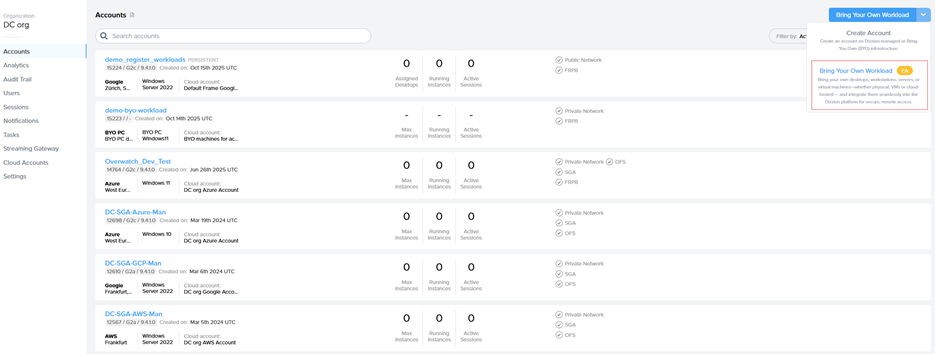
AI-generated content may be incorrect.](https://docs.difr.com/uploads/images/gallery/2025-10/embedded-image-ewkdtlug.png)</span></span>

<span style="font-family: Symbol; mso-fareast-font-family: Symbol; mso-bidi-font-family: Symbol;"><span style="mso-list: Ignore;">·<span style="font: 7.0pt 'Times New Roman';"> </span></span></span><span style="font-family: 'Aptos Display',sans-serif; mso-ascii-theme-font: major-latin; mso-hansi-theme-font: major-latin;">Enter an Account Name and URL and click Create<span style="mso-no-proof: yes;">![A screenshot of a computer
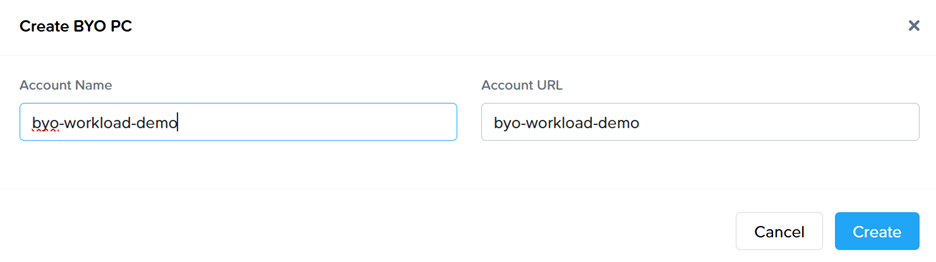
AI-generated content may be incorrect.](https://docs.difr.com/uploads/images/gallery/2025-10/embedded-image-xrttuuy0.png)</span></span>

## Step 2 – Register Workloads

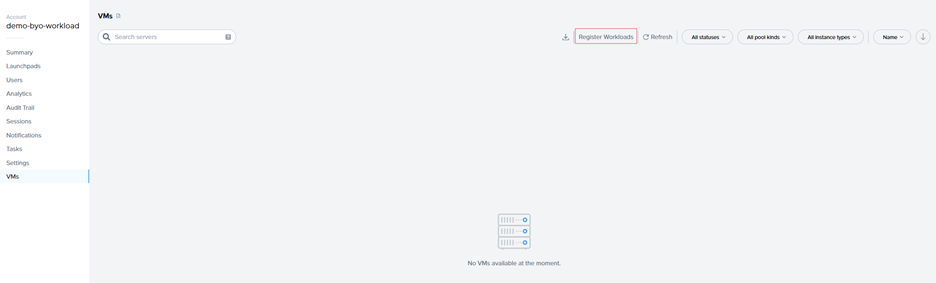
<span style="font-family: Symbol; mso-fareast-font-family: Symbol; mso-bidi-font-family: Symbol;"><span style="mso-list: Ignore;">·<span style="font: 7.0pt 'Times New Roman';"> </span></span></span><span style="font-family: 'Aptos Display',sans-serif; mso-ascii-theme-font: major-latin; mso-hansi-theme-font: major-latin;">Go to the VMs page and select the “Register Workloads.”</span>

<span style="font-family: 'Aptos Display',sans-serif; mso-ascii-theme-font: major-latin; mso-hansi-theme-font: major-latin; mso-no-proof: yes;">![A white screen with a white background

AI-generated content may be incorrect.](https://docs.difr.com/uploads/images/gallery/2025-10/embedded-image-qjxcvr7r.png)</span>

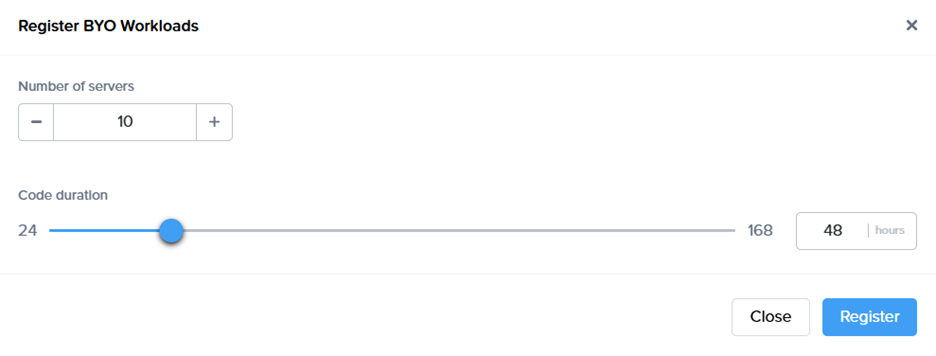
<span style="font-family: Symbol; mso-fareast-font-family: Symbol; mso-bidi-font-family: Symbol;"><span style="mso-list: Ignore;">·<span style="font: 7.0pt 'Times New Roman';"> </span></span></span><span style="font-family: 'Aptos Display',sans-serif; mso-ascii-theme-font: major-latin; mso-hansi-theme-font: major-latin;">Specify the number of workloads you want to import into a persistent desktop pool.</span>

<span style="font-family: 'Aptos Display',sans-serif; mso-ascii-theme-font: major-latin; mso-hansi-theme-font: major-latin; mso-no-proof: yes;">![A white rectangular object with a black line

AI-generated content may be incorrect.](https://docs.difr.com/uploads/images/gallery/2025-10/embedded-image-hduipapt.png)</span>

<span style="font-family: 'Aptos Display',sans-serif; mso-ascii-theme-font: major-latin; mso-hansi-theme-font: major-latin;"> </span>

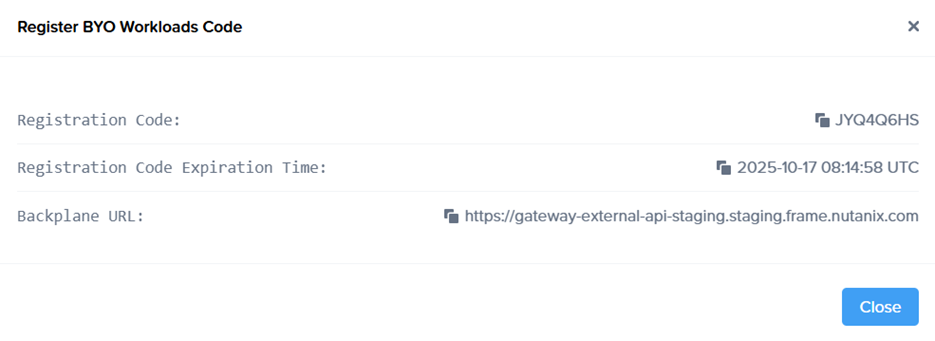
<span style="font-family: Symbol; mso-fareast-font-family: Symbol; mso-bidi-font-family: Symbol;"><span style="mso-list: Ignore;">·<span style="font: 7.0pt 'Times New Roman';"> </span></span></span><span style="font-family: 'Aptos Display',sans-serif; mso-ascii-theme-font: major-latin; mso-hansi-theme-font: major-latin;">A registration code with an expiration time, along with the backplane URL will be displayed. Copt the Code and URL so it can be used later.</span>

<span style="font-family: 'Aptos Display',sans-serif; mso-ascii-theme-font: major-latin; mso-hansi-theme-font: major-latin; mso-no-proof: yes;">![A screenshot of a computer

AI-generated content may be incorrect.](https://docs.difr.com/uploads/images/gallery/2025-10/embedded-image-6hyea5vc.png)</span>

<span style="font-family: Symbol; mso-fareast-font-family: Symbol; mso-bidi-font-family: Symbol;"><span style="mso-list: Ignore;">·<span style="font: 7.0pt 'Times New Roman';"> </span></span></span><span style="font-family: 'Aptos Display',sans-serif; mso-ascii-theme-font: major-latin; mso-hansi-theme-font: major-latin;">New objects appear on the VMs page, serving as placeholders until the actual machines register. If the registration code expires, refresh the page to generate a new one.<span style="mso-no-proof: yes;">![A screenshot of a computer
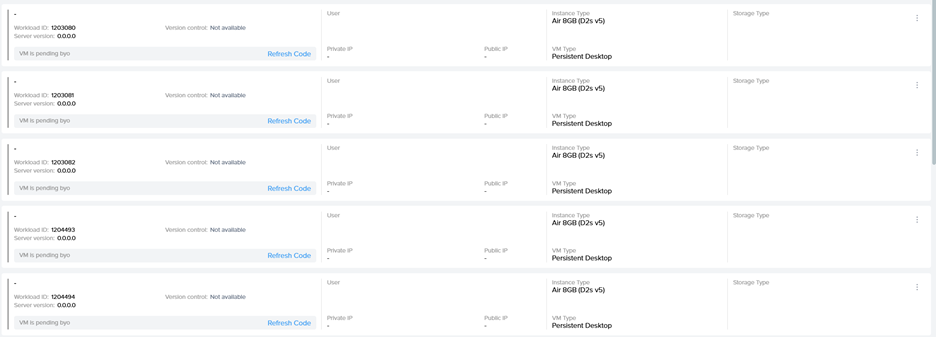
AI-generated content may be incorrect.](https://docs.difr.com/uploads/images/gallery/2025-10/embedded-image-riqjalsa.png)</span></span>

## Step 3 - Install Frame Guest Agent on Workloads

<span class="Heading3Char"><span style="font-size: 14.0pt; line-height: 115%; font-family: 'Aptos Display',sans-serif; mso-ascii-theme-font: major-latin; mso-hansi-theme-font: major-latin;">Manual installation</span></span>

<span style="font-family: 'Aptos Display',sans-serif; mso-ascii-theme-font: major-latin; mso-hansi-theme-font: major-latin;">On each workload VM, log in physically or connect remotely using VNC, Microsoft RDP, Citrix HDX, Omnissa (VMware) Blast, or another preferred protocol. Download the installer, the Frame Agent Setup Tool (FAST): </span>[<span style="font-family: 'Aptos Display',sans-serif; mso-ascii-theme-font: major-latin; mso-hansi-theme-font: major-latin;">http://downloads.difr.com/prod/frame-components/FrameAgentSetupTool.exe</span>](http://downloads.difr.com/prod/frame-components/FrameAgentSetupTool.exe)<span style="font-family: 'Aptos Display',sans-serif; mso-ascii-theme-font: major-latin; mso-hansi-theme-font: major-latin;"> </span>

#### <span style="font-family: 'Aptos Display',sans-serif; mso-ascii-theme-font: major-latin; mso-hansi-theme-font: major-latin; font-style: normal;">Registration via command prompt:</span>

<span style="font-family: 'Aptos Display',sans-serif; mso-ascii-theme-font: major-latin; mso-hansi-theme-font: major-latin;">frameagentsetuptool.exe install frameimage registrationcode=&lt;code&gt; registrationurl=&lt;url&gt;</span>

<span style="font-family: 'Aptos Display',sans-serif; mso-ascii-theme-font: major-latin; mso-hansi-theme-font: major-latin;">Replace &lt;code&gt; and &lt;url&gt; with the values generated in Step 2 of the Workflow.</span>

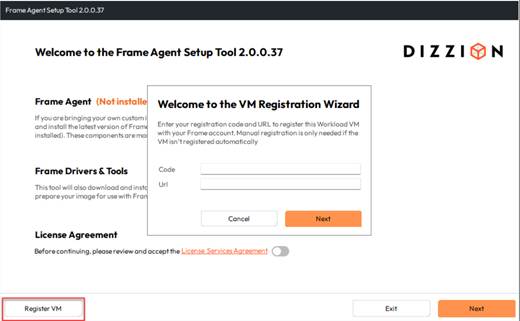
### Registration via UI:

<span style="mso-no-proof: yes;">![A screenshot of a computer

AI-generated content may be incorrect.](https://docs.difr.com/uploads/images/gallery/2025-10/embedded-image-iwuf7wai.png)</span>

<span style="font-family: 'Aptos Display',sans-serif; mso-ascii-theme-font: major-latin; mso-hansi-theme-font: major-latin;">Use &lt;code&gt; and &lt;url&gt; with the values generated in Step 2 of the Workflow.</span><span style="font-family: 'Aptos Display',sans-serif; mso-ascii-theme-font: major-latin; mso-hansi-theme-font: major-latin;"> </span>

### <span style="font-family: 'Aptos Display',sans-serif; mso-ascii-theme-font: major-latin; mso-hansi-theme-font: major-latin;">Unattended installation</span>

<span style="font-family: 'Aptos Display',sans-serif; mso-ascii-theme-font: major-latin; mso-hansi-theme-font: major-latin;">For customers who prefer unattended installations of FAST, this can be deployed automatically using standard management tools.</span>

#### <span style="font-family: 'Aptos Display',sans-serif; mso-ascii-theme-font: major-latin; mso-hansi-theme-font: major-latin; font-style: normal;">Recommended Methods</span>

- <span style="font-family: 'Aptos Display',sans-serif; mso-ascii-theme-font: major-latin; mso-hansi-theme-font: major-latin;">PowerShell Script: Run locally or remotely or distribute via GPO.</span>
- <span style="font-family: 'Aptos Display',sans-serif; mso-ascii-theme-font: major-latin; mso-hansi-theme-font: major-latin;">Intune / Endpoint Manager: Package FAST as a Win32 app and assign to devices.</span>
- <span style="font-family: 'Aptos Display',sans-serif; mso-ascii-theme-font: major-latin; mso-hansi-theme-font: major-latin;">Cloud Startup Scripts: Add the command to Azure Custom Script, AWS User Data, or GCP startup metadata for automatic registration at boot.</span>
- <span style="font-family: 'Aptos Display',sans-serif; mso-ascii-theme-font: major-latin; mso-hansi-theme-font: major-latin;">Use any third-party deployment tool of your choice.</span>

## Step 4 - Automatic Registration

<span style="font-family: 'Aptos Display',sans-serif; mso-ascii-theme-font: major-latin; mso-fareast-font-family: 'Aptos Display'; mso-hansi-theme-font: major-latin; mso-bidi-font-family: 'Aptos Display';">After running the command, the Frame Guest Agent automatically registers the workload. Each workload then appears in the Persistent Desktop Production Pool as an unassigned persistent desktop. This normally will take some minutes.</span>

## Step 5 – Create Launchpad

<span style="font-family: 'Aptos Display',sans-serif; mso-ascii-theme-font: major-latin; mso-hansi-theme-font: major-latin;">Set up a desktop </span>[<span style="font-family: 'Aptos Display',sans-serif; mso-ascii-theme-font: major-latin; mso-hansi-theme-font: major-latin;">Launchpad</span>](https://docs.dizzion.com/platform/admin/launchpads#desktop-launchpad)<span style="font-family: 'Aptos Display',sans-serif; mso-ascii-theme-font: major-latin; mso-hansi-theme-font: major-latin;"> for end users to access these VMs and </span>[<span style="font-family: 'Aptos Display',sans-serif; mso-ascii-theme-font: major-latin; mso-hansi-theme-font: major-latin;">configure e.g. SAML2 permissions</span>](https://docs.dizzion.com/platform/identity-and-access/authorization#user-permissions-with-a-saml2-idp)<span style="font-family: 'Aptos Display',sans-serif; mso-ascii-theme-font: major-latin; mso-hansi-theme-font: major-latin;">.</span>

# Notes:

<span style="font-family: 'Aptos Display',sans-serif; mso-ascii-theme-font: major-latin; mso-hansi-theme-font: major-latin;">Since the workloads are added to Frame without an associated Cloud Account, the Dizzion DaaS and Cloud PC orchestration capabilities available in standard persistent desktop accounts, such as provisioning, scaling, and image management, are not supported.</span>

<span style="font-family: 'Aptos Display',sans-serif; mso-ascii-theme-font: major-latin; mso-hansi-theme-font: major-latin;">The primary purpose of this account type is to provide secure and remote access to existing devices by leveraging the Streaming Gateway Appliance (SGA) and Frame Remoting Protocol (FRP) for high performance, browser based access to Windows Desktops.</span>

<span style="font-family: 'Aptos Display',sans-serif; mso-ascii-theme-font: major-latin; mso-hansi-theme-font: major-latin;">There are several limitations to consider:</span>

- <span style="font-family: 'Aptos Display',sans-serif; mso-ascii-theme-font: major-latin; mso-hansi-theme-font: major-latin;">No Sandbox support: Sandbox creation and related operations are not available.</span>
- <span style="font-family: 'Aptos Display',sans-serif; mso-ascii-theme-font: major-latin; mso-hansi-theme-font: major-latin;">Limited management actions: Computers can only be rebooted (soft reboot through the Frame Guest Agent) or terminated (removed from the Frame console without actions on the device itself).</span>
- <span style="font-family: 'Aptos Display',sans-serif; mso-ascii-theme-font: major-latin; mso-hansi-theme-font: major-latin;">Persistent desktop operations such as backup, restore, resize, and similar actions are not supported.</span>
- <span style="font-family: 'Aptos Display',sans-serif; mso-ascii-theme-font: major-latin; mso-hansi-theme-font: major-latin;">Manual assignment required: Imported desktops are not automatically assigned to users.</span>
- <span style="font-family: 'Aptos Display',sans-serif; mso-ascii-theme-font: major-latin; mso-hansi-theme-font: major-latin;">Enterprise Profiles, Personal Drives, and Domain Joined settings are not available.</span>