Security
Security Basics, Proxy Server Support, HIPAA Compliance, Frame Data Residency,
Security Basics
Security Basics
Sometimes users reside behind corporate networks that have strict network access policies. Connection issues can arise if certain domains are being blocked. To avoid this, administrators ensure that the Network Configuration Requirements for their deployment architecture are met.
Anti-virus Software on Frame
Frame images do not include anti-virus or anti-spyware tools. Administrators are responsible for installing and configuring their own choice of AV/AS tools. For non-persistent Frame accounts, systems are stateless. As long as administrators are diligent about their work in the Sandbox servers, “exposed” production systems that are infected will be reverted on reboot. In the case where Frame provides the initial base image (public cloud infrastructure only), Frame ensures that all base images are scanned before customers use them to create their Frame accounts.
While many anti-virus software packages will work on Frame, due to the large number of anti-virus packages, and the possible complexity of configuration, interoperability is not guaranteed. Anti-virus software that prevents components of the Frame service from executing may cause loss of functionality within a Frame session, up to and including a complete inability to connect to sessions. Prior to installing an anti-virus package, a backup of your account's Sandbox should be taken in the event that issues occur. Since most Frame customers use stateless systems, all anti-virus database updates will download each time a production instance is started. This can be avoided either by maintaining the Sandbox image (updating the Sandbox and publishing to production instances regularly) or using Persistent Desktops.
Exclusion Rules
Any anti-virus software used on Frame-managed workloads must be configured to allow the following directories and associated sub-directories:
-
C:\\ProgramData\\Nutanix\\Frame\\Contains libraries and utilities for Frame Service, Server, and logs (FGA 8.x).
-
C:\\Program Files\\Nutanix\\Frame\\Contains Frame Service executables which provide communication to the Frame Platform for orchestration (FGA 8.x).
-
C:\\Program Files\\OFS\\Contains Frame file system driver and control application.
-
C:\\OFS\\Contains Frame file system driver components.
If you intend to use Enterprise Profiles, please allow the following folders and files:
Folders:
C:\\Program Files\\ProfileUnity\\and all subfoldersC:\\Windows\\Temp\\ProfileUnity\\C:\\FADIA-T\\C:\\ProfileDiskMounts\\
Files:
C:\\Windows\\System32\\drivers\\Cbfltfs3.sysC:\\Windows\\System32\\drivers\\Cbfltfs4.sysC:\\Windows\\System32\\drivers\\Cbreg.sysC:\\Windows\\System32\\drivers\\cbfsfilter2017.sysC:\\Windows\\System32\\drivers\\cbfsregistry2017.sysC:\\Windows\\System32\\drivers\\cbregistry20.sysC:\\Windows\\System32\\OFS_x64.dllC:\\Windows\\System32\\drivers\\OFS.sys
Please ensure that anti-virus "Tamper protection" is disabled during the publishing process.
During a Sandbox publish, Frame will clone the Sandbox disk image to create production workload VMs. If the Frame account is configured for domain-joined instances, then the Sandbox disk image is cloned and the cloned Sandbox disk image is used to create a new VM ("Generalized Sandbox VM"). This Generalized Sandbox VM is powered on and generalized using sysprep before creating the domain-joined production workload VMs. Consult with your anti-virus solution provider to determine if your anti-virus solution must be configured to account for either of the two Frame publishing workflows.
SSL Break and Inspect
Frame Remoting Protocol (FRP) is an H.264-based bi-directional communication protocol between the end user and the workload VM. This communication consists audio/video streamed from the workload VM to the user's endpoint and keyboard/mouse/peripheral input from the end user's endpoint to the workload VM. With FRP 7.0, the protocol uses Secure WebSocket (WSS) over Transport Layer Security (TLS). With FRP 8.0, the protocol builds on WebRTC, a real-time communication protocol using UDP and Datagram Transport Layer Security (DTLS). Customers can use out-of-band monitoring solutions to monitor these FRP streams; however, inline or in-band solutions that break and inspect FRP traffic are not supported as they either prevent FRP from functioning or introduce latency that degrades the end user experience. From the end user's perspective, SSL break/inspect can result in sluggish desktop behavior, the display video skipping frames, and abrupt disconnects of the video stream while in session.
From a security perspective, the FRP streams does not add an inherent risk as it is a video/audio stream from workload to endpoint. If clipboard synchronization, file upload/downloads, microphone input, and remote printing are disabled for the users' Frame sessions, then the only data being sent to the user endpoint is the audio/video display of the desktop and keyboard/mouse events from the user to the workload VM. Breaking and inspecting the traffic will only reveal raw data streams (H.264 encoded display pixels) and keyboard/mouse events.
Frame orchestration and brokering management communication between Frame Guest Agent (FGA) on the workloads and Frame Platform as well as from Prism Central/Element to Frame Platform originates within the customer's private network from the workloads and Cloud Connector Appliance (CCA) VMs as HTTPS requests, switching over to Secure WebSocket over TCP or WebRTC over UDP for bidirectional communication. FGA on the workload VMs and CCAs can be configured to support outbound HTTPS/Secure WebSocket proxy servers.
Outbound Proxy Server Support
Frame Guest Agent (FGA) and Cloud Connector Appliance (CCA) have native support for outbound proxy server if a proxy server is required from a VM inside a private network to communicate to the Internet. The outbound proxy server must support both HTTPS and Secure WebSocket (WSS) traffic. This Frame proxy server configuration is independent of the proxy server configuration of the operating system.
Frame Guest Agent
Windows administrators must explicitly set the FGA proxy settings and have those settings persist in the test and production pool VMs. The approach to setting these FGA proxy settings will depend on the Frame account type and configuration:
- For non-domain-joined, non-persistent Frame accounts, the FGA proxy settings can be updated in the Sandbox and then published to the test and production pools.
- For domain-joined, non-persistent Frame accounts or with persistent desktop Frame accounts, administrators must persist these FGA proxy settings using a post-generalization script or via domain GPOs (for domain-joined Frame accounts). For these two Frame account configurations, Frame executes a Microsoft Sysprep during the publish process to prepare the test and production pool VMs.
The FGA proxy configuration does not affect the Windows OS, user, or third-party application proxy settings.
Configuration
-
Back up your Sandbox before making any changes to the FGA proxy settings.
-
Using the FrameProxyHelper tool which is available in
C:\\ProgramData\\Nutanix\\Frame\\Tools, configure all required fields and verify the configuration by clicking the "Start test" button. The images below show a successful proxy test.

- Depending on your environment, you can test predefined Commercial or Government endpoints. You can also use custom endpoints by clicking on the “Custom” button, adding your endpoints to the list and confirming with the green check mark button.

- Lastly, save your settings by clicking the "Save Settings" button. Reboot the VM in order for your changes to take effect.

For AHV, we recommend this proxy server configuration be done in the Windows template images. If sysprep removes the proxy server settings, you will have to connect into the Sandbox using RDP, after the Frame account is created, to update the FGA's proxy server settings.
Troubleshooting
To remove the Frame Guest Agent proxy server configuration to troubleshoot, restore your Sandbox backup or go to the Sandbox and (using regedit) delete the contents of:
HKLM\\Software\\Nutanix\\Frame\\Fga\\ProxySettings\\Cloud Connector Appliance
The AHV administrator can configure each CCA VM to use an outbound proxy server. Step-by-step instructions for enabling outbound proxy server support are discussed in the Configuring your CCA VM instructions.
HIPAA Compliance
HIPAA and the later adoption of the HITECH Act established through the Department of Health and Human Services is a set of Privacy and Security Rules governing the handling of Protected Health Information (PHI). Under these rules, "Covered Entities"[^1] are required to meet certain security and data requirements in order to keep PHI safe.[^2] Covered Entities who utilize third-party entities (such as a Service Provider) who will "create, receive, maintain or transmit" PHI in providing a function, activity, or service on behalf of that Covered Entity are defined as a "Business Associate." In most cases, any Business Associate must enter into a Business Associate Agreement (BAA) with the Covered Entity.
Security and privacy for our customers is one of the key tenants of our Frame Desktop as a Service (DaaS) platform. Our security and compliance team, in coordination with Frame Legal, has determined the necessary deployment models, responsibilities, and actions a Covered Entity or Business Associate of Frame must follow in order for Frame to execute BAAs.
The architectural design requirements for Frame described below are required for Frame to enter into a BAA.
Deployment Requirements
- Covered Entities may use Frame-supported public cloud platforms or on-premises Nutanix infrastructure. Public cloud Frame deployments must utilize the Bring Your Own (BYO) infrastructure capability.
- Covered Entities must leverage the full Private Networking configuration option when deploying Frame. Any ingress into the Frame-managed workload VMs and egress from the workload VMs must be controlled through the customers' security appliances.
- If applicable, Frame deployments may use Enterprise Profiles.
- Covered Entities must bring their own SAML2-based identity provider (IdP). These entities may not use my.nutanix.com or the Frame IdP as identity providers.
- User authorization to PHI must be enforced by the Covered Entity's applications. These entities may not rely solely on Frame's Role-based Access Control (RBAC) to determine which users have access to PHI.
- Frame Support access must be disabled at the Frame Customer entity level by the Covered Entity. Frame Support personnel will then be restricted from accessing any of the accounts, their configurations, activity logs/reports, virtualized desktops/applications, or data within the Covered Entity's Frame-managed infrastructure.
- Application icons and background images may not contain any protected health information.
- Covered Entities may not use the Persistent Desktop feature or Frame Utility Servers to store PHI.
Note on ePHI Data Storage and Processing:
Covered Entities may not store or process ePHI on Frame-owned or managed infrastructure.
Customer Requirements
As with all cloud services, there is a shared responsibility between cloud service providers and end customers. To support HIPAA requirements, customers (Covered Entities) are responsible for the following:
- Policy controls and HIPAA compliance of their environment and workloads.
- Utilize Frame's Bring Your Own (BYO) infrastructure capabilities with either:
- On-premises Nutanix AHV infrastructure or
- A public IaaS provider cloud account (Covered Entity must enter into a Business Associate Agreement with their IaaS provider)
- Monitor their DaaS workloads and supporting network infrastructure.
- Ensure the security of their own DaaS workload configurations.
- Security and monitoring of their own IaaS provider configurations.
- Implement user authentication and authorization prior to enabling user access to HIPAA data/PHI via Frame.
- Configure Frame workloads and supporting infrastructure to meet availability requirements.
- Implement all technical and administrative controls necessary to govern access to ePHI data.
- Collect and retain audit logs for ePHI access.
- Restrict cloud credentials provided to Frame to ensure Frame does not have access to ePHI data.
- Enter into a Business Associate Agreement (BAA) with Frame.
BAA Scope
Frame will only enter BAAs scoped to our cloud service and supporting infrastructure. The scope of these Business Associate Agreements will not include the customer DaaS workload environments. Covered Entities are responsible for independently entering into a BAA with their cloud or data center service providers that host their DaaS workloads. Please reference the links below for more information about BAAs with currently supported cloud providers:
[^1]: A "Covered Entity" is a "Health Care Plan, Health Care Provider, or Healthcare Clearing House". Please note that Business Associates may also have downstream Business Associates who would need to comply with these requirements, (e.g., AWS as the platform hosting a SaaS application).
Refer to https://www.hhs.gov/hipaa/for-professionals/privacy/laws-regulations/index.html for the definition of protected health information.
Frame Data Residency
Frame, a cloud-based Desktop as a Service (DaaS) and Platform as a Service (PaaS), enables customers to deliver virtualized applications and desktops hosted in either public and/or private clouds to end users. End users only need an HTML5 browser on a connected device. Frame operates and maintains the Frame Platform which provides customers with automated cloud resource orchestration, user session brokering, and environment administration.
With a distributed system such as Frame, customers must understand how their data, particularly customer data and personal information is collected, processed, transmitted, stored, and safeguarded. Data residency defines the physical location(s) of an organization's data, usually for regulatory reasons.
This document outlines what Frame-specific operational data, customer data, and customer-provided personal information is generated, collected, and transmitted. This document also describes the data safeguarding measures Frame and customers must implement to ensure the data is secured.
What Data is Stored Where?
The figure below is a visual representation of the different domains where data is accessed and transmitted during a Frame session.

This section defines the data generated, received, transmitted, and/or stored on the end user's device.
- Authentication Token: A security token, generated by the Frame identity service, granted to a user once the user is authenticated based on the validity of the SAML2 or OAuth2 assertion. The security token is valid up to the Authentication token expiration value configured in the Frame SAML2 authentication provider configuration. If the user is inactive for the configured amount of time, Frame Console will logout the user. If the user is active within the console (e.g., clicks on hyperlinks, moves the mouse/cursor, scrolls, or presses keys), the token will be renewed just before the token expires. If the user is in a Frame session, the token is automatically renewed so the user is not disconnected while in session. For customers using SAML2 identity providers, roles (authorization) assigned to the user are based on the SAML claim(s) that are provided by the customer's identity provider.
- Session Token: A Frame session security token, generated by Frame Platform and provided to the user's browser, after an authenticated and authorized user has started a session. The session token is presented by the user browser to Frame Platform, Streaming Gateway Appliance (if deployed as a reverse proxy server), and the assigned workload VM. The user is only allowed to access the protected resource once the user's session token is validated by the Frame Control Plane. The session token can only be used with the assigned workload VM and is valid up to the max session duration time configured within the Dashboard.
- Session Stream: Session Stream is the video stream of the display(s) and audio, encoded in the Frame Remoting Protocol, an H.264-based video stream, sent from the workload virtual machine (VM) to the user's browser. Any keyboard/mouse events, input audio (if microphone is enabled), and input video (if webcam is enabled) is sent from the user to the workload VM. The Frame Remoting Protocol (FRP) 7 uses Secure WebSocket (tcp/443, TLS) and FRP8 uses WebRTC (udp/3478 or udp/4503-4509, DTLS) to communicate between end user and workload VM.
- Session Metadata: Session metadata refers to the generation of details in the end user's device that are collected by Frame Platform when various operations are performed during a Frame session. The data can be used to identify users, session start times and durations, instance type used, session type (desktop or published applications), published applications used, as well as other operational details. Below are the data inputs that represent the session metadata:
- User device and workload VM IP addresses: Identifies the Internet Protocol (IP) address of the user's device and the workload VMs accessed by the user during a Frame session. Both IP addresses may be private (private networking) or public.
- User identifier: This description identifies the user in the session. This identifier is in the form of an email address. Depending on the customer, this user identifier may be an actual or fictitious email address, provided by the customer's identity provider or Frame Secure Anonymous Token feature.
- Session ID: The numeric identifier of a specific virtual Frame session.
- Session Type: Desktop or Application
- Published application launched: This describes the application(s) in-use by the user.
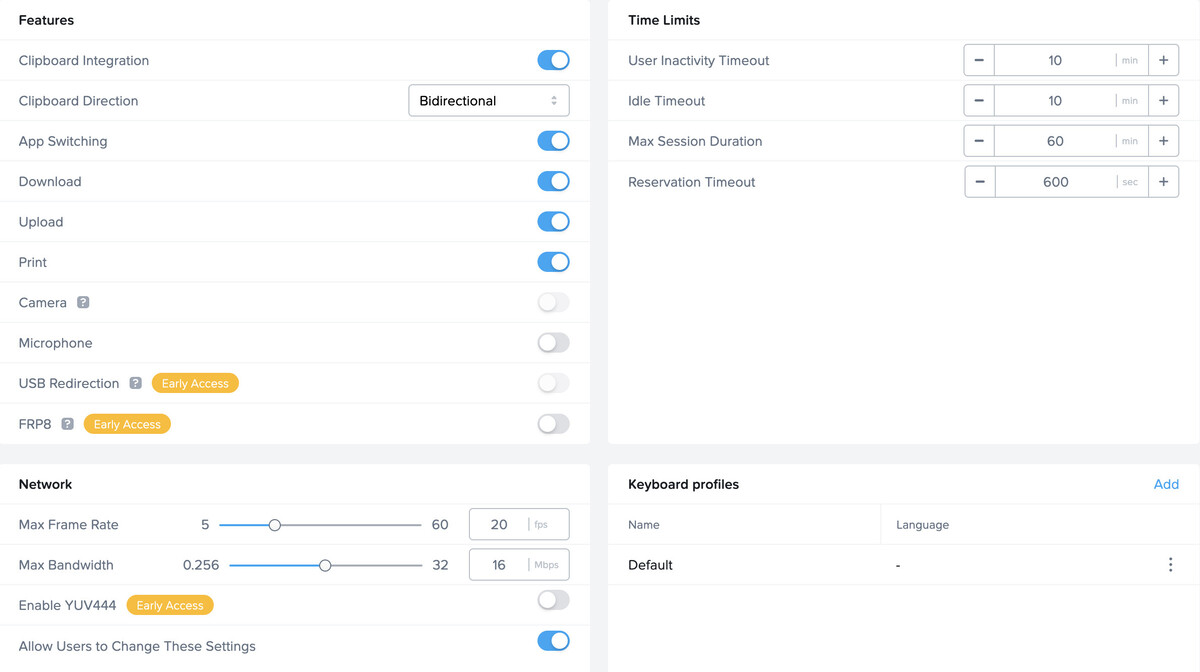
- Clipboard: End users have the ability to copy and paste bidirectionally between the user's device and the workload VM or unidirectionally, if the administrator enables the feature in Session Settings for a Frame Account.
- Upload/Download: End users have the ability to upload and/or download files between the user's device and the workload VM, if the administrator enables the feature in Session Settings for a Frame Account.
- Printer: End users have the ability to print on printers locally accessed by the user's device, if the administrator enables the feature in Session Settings for a Frame Account.
- Microphone: The end user can send input audio from the microphone on their endpoint to the workload VM, if the administrator enables the feature in Session Settings for a Frame Account.
- Webcam: The end user can send input video from the webcam on their endpoint to the workload VM, if the administrator enables the feature in Session Settings for a Frame Account.
Frame Platform Data
For all Frame (Commercial) deployments, both US domestic and international, Frame Platform data is stored in the AWS US East region. For Government Cloud (FedRAMP), Frame Platform data is stored in AWS GovCloud (US West 1).
In addition to the data types transmitted to/from the end user described in the above section, the following data is received, transmitted, generated, and/or stored by Frame Platform as part of the service.
-
User identity and attributes: Depending on the customer's choice of identity provider and what personal information the identity provider passes to Frame Platform, Frame Platform will store user identity and attributes for authorization and activity logging, Common parameters provided as part of any user authentication event are:
- First name and last name
- Email address
- Associated groups
Some customers can choose to anonymize user identities during user authentication events by providing fictitious first name, last name, and email addresses to Frame Platform. However, that may result in anonymous activity logs or require customers to correlate Frame activity logs with their own system logs.
-
System Configuration: Frame Platform also stores system configurations for each customer in order for customers to be able to customize their environments and user session behavior. These configuration options include:
-
Role-based access control (RBAC) settings: Allows the customer to grant access to features and functionality based on the user's role within Frame Platform once the user has authenticated to Frame via a customer-selected identity provider.
-
Capacity settings: Provides the customer with the ability to specify the number of virtual machines for a given instance type and the power management schedule of these virtual machines.

-
Session settings: Enables user features, session timeout policies, and Quality of Service settings at the account level or on specific Launchpads.

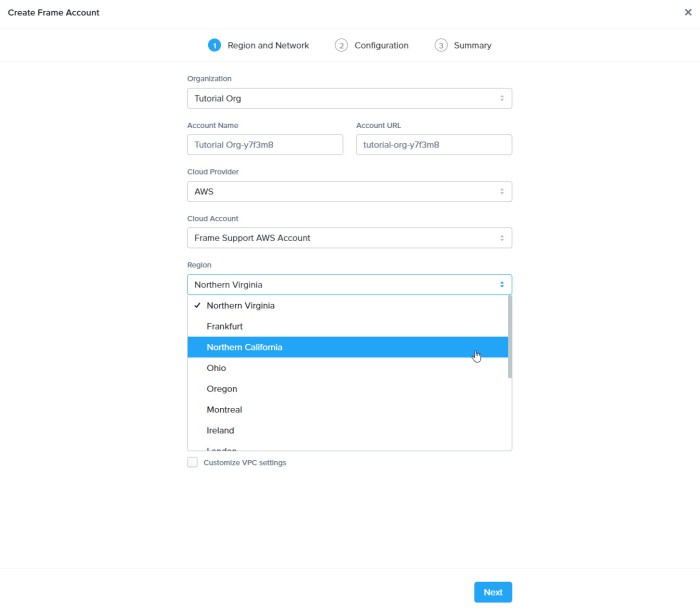
- Cloud/data center configurations: Determines the public cloud regions or Nutanix AHV clusters that will be used to provision Frame accounts.

- Cloud Credentials: Holds the information required for interacting with the public IaaS API gateways. For AWS, it is an IAM role created by the customer using a Frame-supplied Cloud Formation template. In the case of Azure, it is an Azure Active Directory app registration. For Google, it is a Google Project ID.
- Onboarded Application Information: Stores information about the onboarded applications (i.e., published applications). Specifically, the application icon, application executable path, working directory, and command line arguments.
- Windows Events: The Frame Guest Agent will parse and send specific Windows Logs (Application and System) to the Frame Logging endpoint to assist Customer Support and Customer Success with troubleshooting workload issues. This data is retained for 21 days. Customers may opt out by contacting Support if they prefer these Windows Logs to not be collected.
By default, the event sources are: + _Windows Logs > Application:_ + _MsiInstaller_ + _Application Error_ + _Windows Error_ + _RestartManager_ + _FrameLogonScript_ + _FrameTaskbar_ + _.Net Runtime_ + _User Profile Service_ + _Windows Logs > System:_ + _Service Control Manager_ + _User32_ + _WindowsUpdateClient_ + _Applications and Services Logs > Microsoft > Windows:_ + _User Device Registration_ + _AAD_ + _HelloForBusiness_ -
Workload VM Data
-
Session Token: described in the prior section
-
Session Stream: described in the prior section
-
Session Metadata: described in the prior section
-
Session Telemetry: Session telemetry refers to the measurement of session characteristics between the end user's browser and the Frame workload VM (e.g., bandwidth, latency) and the reporting of workload VM performance metrics (e.g., CPU, memory). This data is collected by Frame Platform and used to evaluate session performance and quality of the experience for the user. The two key metrics are:
-
Bandwidth: Refers to the real-time data transmission capacity of the network between the user and the workload VM. When a user is in a Frame session, the real-time bandwidth is displayed on the left of the Frame status bar. 5 indicator dots next to the Frame gear menu icon give a visual representation of the user's current bandwidth measurement:
- Red dots: 1 to 2 Mbps
- Yellow dots: 2 to 4 Mbps
- Green dots: 4 to 8+ Mbps
-
Latency: Refers to the delay before a transfer of data begins following an instruction for its transfer. This is the time it takes for a single packet of data to go from the user's browser to the workload VM.
-
-
Clipboard: described in the prior section
-
Upload/Download: described in the prior section
-
Data Processing: All applications installed by the customer or its users execute on the workload VMs. The customer has the option of offloading the processing of data to other compute infrastructure (e.g., rendering engines, machine learning servers, application servers) controlled, managed, and/or selected by the customer.
-
Storage Mounts/Data: Any data generated by these applications remains within the workload VM until the user saves the data in persistent storage (profile disk, personal drive, file server, cloud storage). The customer determines what persistent storage options the end user may use (and where the persistent storage is located).
-
Sandbox Configuration (template image): Each Frame account has one Sandbox, a VM that manages the master image for the account. Customer administrators use the Sandbox to install and update their applications and manage the operating system. When the administrator publishes the Sandbox, a snapshot of the Sandbox image is backed up and cloned to create the production VMs of the Frame account. The Sandbox VM is persistent. Any applications or files stored in the Sandbox image will be included in the production VM images.
-
User Profiles: For non-persistent Frame accounts, customer administrators can enable the Frame Enterprise Profile feature in order for user application profiles and user folders (e.g., Documents, Desktop, Downloads, etc.) to be redirected to user profile disks. This profile disk is mounted when a user enters a Frame session and unmounted when a user closes their Frame session. User profile disks are stored as part of the Frame account. The user can backup and restore their own user profile disk.
-
Personal Drives: Customer administrators can configure a Frame account to provision and manage a personal drive for each user. User personal drives are stored as part of the Frame account. The user can backup and restore personal drives.
Safeguarding Data
Cloud services is a shared-responsibility model. Frame and customers each have a shared responsibility to ensure the data is protected. Frame is responsible for the security of Frame Platform. Customers are responsible for the security of the users' endpoints, their infrastructure they bring to Frame, including the workload VMs, and any use of application and storage services they provide to their users.
Confidentiality
In general, Frame stores all data at rest in an encrypted form using the underlying infrastructure's storage encryption capabilities, including the safeguarding of the storage encryption/decryption keys. The encrypted data includes data stored within Frame Platform as well all data stored in the workload VM disks, profile disks, and personal drives.
All communications between the system components are encrypted using TLS 1.2 (HTTPS and Secure WebSocket) and DTLS (FRP8, WebRTC).
Authentication
Frame supports the ability for customers to integrate their own enterprise SAML2 or OAuth2 identity provider with their Frame customer (or an organization) entity. Customers may integrate as many identity providers as they wish at the customer or organization entity levels.
Authorization
Frame provides customers who integrate an enterprise SAML2 or OAuth2 identity provider the ability to define authorization rules which grants users (or groups of users) the specified privileges to access or perform operations on specific protected resources.