# Session API
The Frame Session API lets you seamlessly integrate virtual desktops and
applications into your own custom web-based workflows. Using JavaScript,
the Session API gives you control of the Frame Terminal, an HTML5 client
for remotely accessing applications hosted on your Frame account in the
cloud. With the Frame Session API, you can stop or resume application
sessions, query application information, and much more.
### Session API Prerequisites
- An active Frame account with published applications and a configured Launchpad.
- An active [**SAML2**](/books/platform-administrators-guide/page/general-saml2-integration) or a [**Secure Anonymous Token**](/books/platform-administrators-guide/page/secure-anonymous-tokens) provider with roles and permissions configured (for session authentication).
- [Nodejs](https://nodejs.org/) and **npm**.
- **A web application bundler** like
[Webpack](https://webpack.js.org/),
[Vite](https://vitejs.dev/), or
[Parcel](https://parceljs.org/) to bundle
Frame's Session API for use in a browser.
- **Terminal Configuration ID**. This is a unique ID that represents
which Launchpad and resource pool you would like Terminal to launch
sessions from.
- **Application ID**. Used to start Specific apps. Application IDs are
not used with Desktop Launchpads.
## Required Session API Components
The following components are required for the Frame Session API:
- Service URL (Frame environment endpoint)
- Launchpad Terminal Configuration ID
- Application ID (application Launchpads only)
- Authentication token
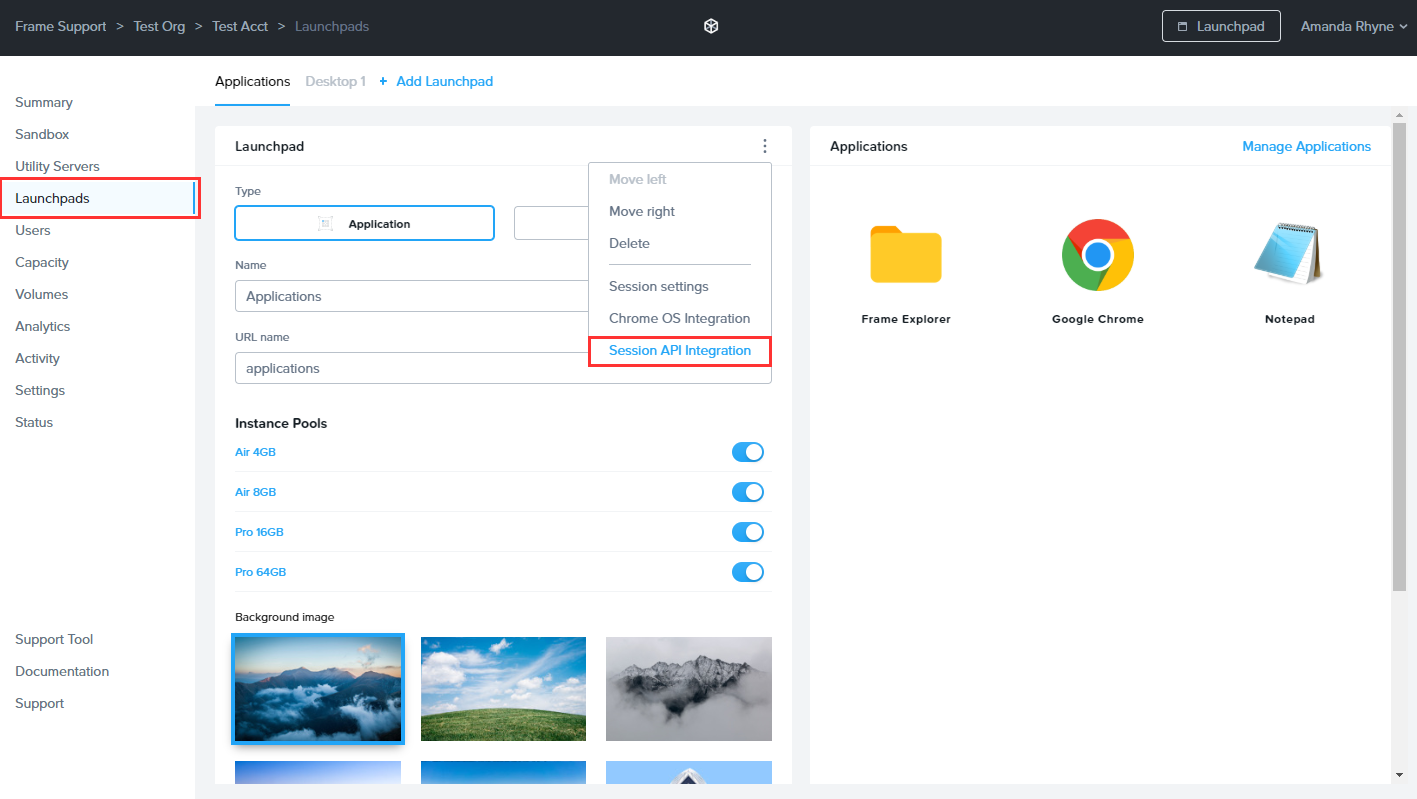
To obtain these components, navigate to the Dashboard of the account you
wish to use with the Session API. Click **Launchpads** on the left menu.
Click on the ellipsis in the upper right corner of your desired Launchpad
select **Session API Integration**.
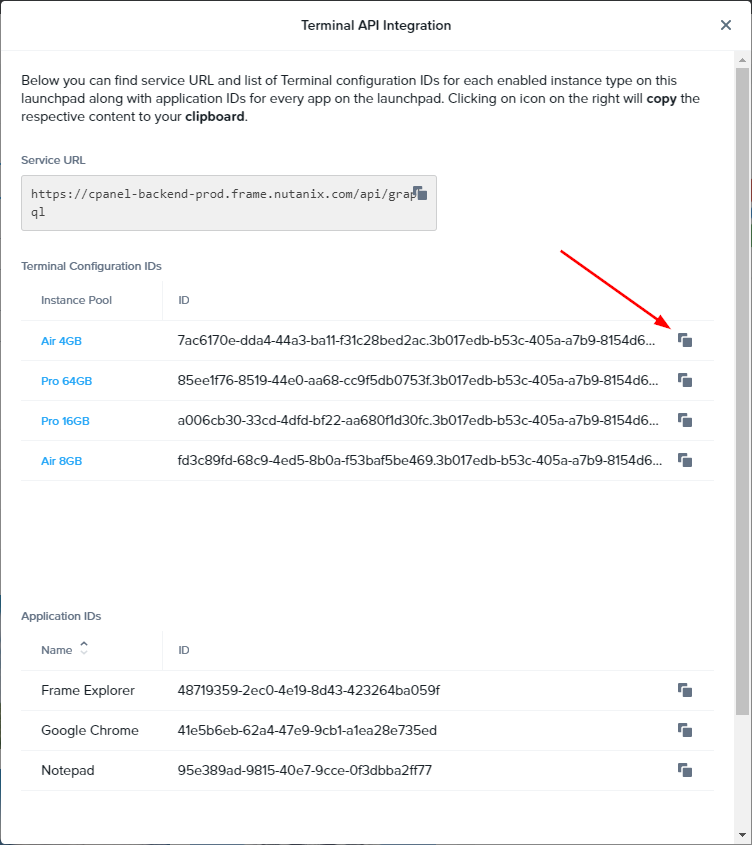
A new window will appear providing you with the service URL, a list of
Terminal configuration IDs for each enabled instance type on this
Launchpad, and Application IDs for every application on the Launchpad.
You can copy all required information by clicking on the copy icon
listed to the right of each ID.
Sessions require a valid authentication token provided by Frame's
identity services. There are **two** different methods to obtain these
tokens:
- [Secure Anonymous Token (SAT) API](/books/platform-administrators-guide/page/secure-anonymous-tokens)
- [Single Sign-On (SSO)](/books/developers-guide/page/acquire-tokens-through-sso-saml2)
The **SSO** workflow involves sending a user to a Single Sign-On (SSO)
URL which triggers multiple SAML2 redirects to sign the user in to their
IdP. Once the user is authenticated, the user's browser will be
redirected to a specified URL with the token appended as a URL search
query parameter.
The **SAT** workflow involves a user visiting a self-hosted website.
When receiving the request, the web server can use our SAT API to
retrieve a token for that user. After the token is instantly retrieved,
the page can be loaded, passing the token to the user's browser.
## Installation
First, you will need to install the Frame Terminal package. Once
installed, we recommend using a [web application bundler](#session-api-prerequisites)
to bundle your JavaScript app for browsers for the modern web.
To get started, run the following command from your command line:
```bash
npm install @fra.me/terminal-factory
```
This package contains a factory method, which builds a Frame Terminal
instance based on account-specific parameters that are passed into it.
With these account parameters, the factory will download the required
components to specification, fetch all the assets from our CDN, and
create an instance of the Frame Terminal. You will automatically receive
any updates, features, and improvements without needing to update the
npm package with this factory module.
## Instantiate a Terminal Instance
The Session API requires the following parameters to instantiate a Terminal
instance:
| Parameter | Description |
| -------------------- | -------------------------------------------------------------------------------------------------------------------------------------------------------------------------------------------------------------------------------------------- |
| **serviceUrl** | Indicates which Frame environment you're streaming apps from. This value is almost always going to be `https://cpanel-backend-prod.frame.nutanix.com/api/graphql` |
| **terminalConfigId** | A unique ID that represents which Launchpad and VM resource pool you would like to use the API to stream sessions from. |
| Auth Token (**JWT**) | A JSON Web Token acquired through Frame authentication workflows (via [SAML2 integrations](/books/platform-administrators-guide/page/general-saml2-integration) or a [Secure Anonymous Token Provider](/books/platform-administrators-guide/page/secure-anonymous-tokens).) |
Once you have the necessary information to create a Terminal instance
and start sessions, you can include the Frame Session API in your code.
Then, use the `createInstance` method along with an `Async/Await` function
to pass in an object specifying the 3 key attributes above.
```javascript
let terminal; // declare a variable for a Terminal instance.
const loadFrame = async () => {
// Session API Parameters
const terminalOptions = {
serviceUrl: "https://cpanel-backend-prod.frame.nutanix.com/api/graphql",
terminalConfigId: "38cb4f1c-a019-4163-9f1d-168b59fb5062.0f3a542b-884e-4edc-aa5f-65380597061",
token: "eyJhbGciOiJIUzI1NiIsInR5cCI6IkpXVCJ9.eyJzdWIiOiIxMjM0NTY3ODkwIiwibmFtZSI6IkpvaG4gRG9lIiwiaWF0IjoxNTE2MjM5MDIyfQ.SflKxwRJSMeKKF2QT4fwpMeJf36POk6yJV_adQssw5c"
};
// Create a Terminal instance and bind it to the `terminal` variable.
try {
terminal = await createInstance(terminalOptions);
// more code...
} catch (e) {
// handle error
}
}
```
If your configuration options were accepted and the token is valid,
`terminal` can be used to start sessions, pass custom data to the remote
VM, etc.
## Session Workflow Events (Terminal Events){#terminal-events}
During the lifetime of a Session API Terminal instance, various events will be triggered so that the parent page is informed about Terminal changes. If you want to register a handler for a specific event, you should use the bind function:
```javascript
terminal.bind("someEventName", function(event) {
console.log("Event has been thrown: " + event.code);
});
```
**Session API Terminal Events**
| Event | Description |
| ---------------------------------- | ------------------------------------------------------------------------------------------------------- |
| TerminalEvent.SESSION_STARTING | Triggered when a session is starting. |
| TerminalEvent.SESSION_STARTED | Triggered when the session start process has completed. |
| TerminalEvent.SESSION_RESUMING | Triggered when a session begins the resume process. |
| TerminalEvent.SESSION_RESUMED | Triggered when a session completes the resume process. Triggered only when the first frame is rendered. |
| TerminalEvent.SESSION_CLOSING | Triggered when a session begins the close process. |
| TerminalEvent.SESSION_CLOSED | Triggered when a session has finished the close process. |
| TerminalEvent.SESSION_DISCONNECTED | Triggered when a session has been disconnected (not closed). |
| TerminalEvent.SESSION_STATISTICS | Triggered each time we calculate the session's performance metrics. |
| TerminalEvent.USER_INACTIVE | Triggered when a user is considered inactive (no input received over a specified duration). |
For example, the syntax for listening for the `TerminalEvent.SESSION_STARTING` event would be:
```javascript
terminal.bind(TerminalEvent.SESSION_STARTING, function(event) {
console.log("Event has been thrown: " + event.code);
});
```
Events must be bound **before starting or resuming a session**.
## Start Sessions
Starting a session is relatively straightforward. You can start two types of sessions – Application and Desktop sessions.
Starting a Desktop session:
```javascript
await terminal.start();
```
Starting an Application session is very similar but the start method requires an object with an `appId` parameter.
```javascript
await terminal.start({ appId: "3cb37b52-34af-4676-90d6-6b104b87061b" });
```
### Pass data into the session with userData{#userdata}
When invoking start(), you can optionally pass custom data via a userData object property.
For example, to start a desktop-based session with additional data:
Here's another example, starting an app-based session with additional
data:
```javascript
const sessionData = { userData: "any data you'd like to pass into the session" };
await terminal.start(sessionData);
```
Here's another example with a JSON object as a string:
```javascript
const exampleData = `{"user": "John Smith","user_id": "1588383008","token": "eyJhbGciOiJIUzI1NiIsInR5cCI6IkpXVCJ9.eyJzdWIiOiIxMjM0NTY3ODkwIiwibmFtZSI6IkpvaG4gRG9lIiwiaWF0IjoxNTE2MjM5MDIyfQ.SflKxwRJSMeKKF2QT4fwpMeJf36POk6yJV_adQssw5c"}`
await terminal.start( { appId: "xyz", userData: exampleData } );
```
### Retrieve userData from the remote system
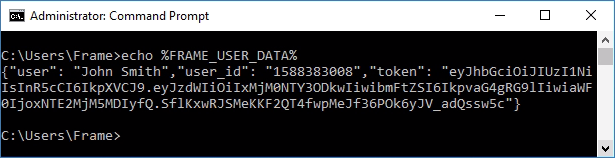
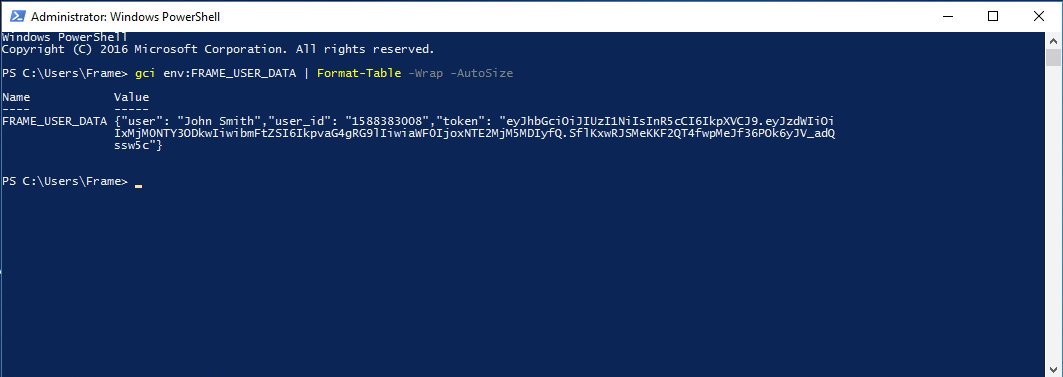
When *userData* is supplied at the start of a session, it can be
found in the remote system as an environmental variable named
`FRAME_USER_DATA`.
Example in Command Prompt:
Example in PowerShell:
```powershell
Get-ChildItem Env:FRAME_USER_DATA | Format-Table -Wrap -AutoSize
```
You can use this userData parameter to pass any information you'd like
into the remote system. Then, use scripts/software on the remote system
to access and parse those variables.
The *userData* parameter can only contain a single string within 10,000
characters.
## Resume Sessions
If a user disconnects from a session (e.g. timed out, manually disconnected,
or refreshed their page) and would like to resume their session, all you
need is their active session ID. With the session ID, you can resume a
session as follows:
```javascript
const session = await terminal.getOpenSession();
if (session) {
await terminal.resume(session.id);
}
```
## Error Handling
Handling Session API errors is rather simple using `try/catch` blocks
with `async/await`. When an error is caught, you must have access to
the error `name`, `message`, and `stack` attributes.
Here is an example of catching an invalid or expired auth token:
```javascript
const loadFrame = async () => {
// Session API Parameters with an expired token
const terminalOptions = {
serviceUrl: "https://cpanel-backend-prod.frame.nutanix.com/api/graphql",
terminalConfigId: "38cb4f1c-a019-4163-9f1d-168b59fb5062.0f3a542b-884e-4edc-aa5f-65380597061",
token: "eyJhbGciOiJIUzI1NiIsInR5cCI6IkpXVCJ9.eyJzdWIiOiIxMjM0NTY3ODkwIiwibmFtZSI6IkpvaG4gRG9lIiwiaWF0IjoxNTE2MjM5MDIyfQ.SflKxwRJSMeKKF2QT4fwpMeJf36POk6yJV_adQssw5c"
};
try {
terminal = await createInstance(terminalOptions);
// ..
} catch (err) {
console.error(err.message); // Network error: Response not successful: Received status code 401
}
}
```
Try/catch blocks will only catch errors "bubbled" up from
**asynchronous** calls. For example, you must call async methods like
`await terminal.start()` instead of `terminal.start()`.
### Error Codes
**Frame Session API Terminal Error Codes**
| Code | Name | Description |
| ---- | ------------------------------------- | --------------------------------------------------------------------------------------------------------------------------------------------------- |
| 5000 | USER_ABORTED_CONNECTION | User-initiated disconnect from the network connection. |
| 5001 | CONNECTION_ABORTED | The network connection was lost. |
| 5002 | CONNECTION_LOST | Network was disconnected. |
| 5100 | CONFIG_VALIDATION_ERROR | Terminal configuration parameters are not valid. |
| 5101 | TERMINAL_LOAD_FAILED | The Frame Terminal assets failed to load from our CDN. |
| 5102 | TOKEN_MISSING | No token provided. |
| 5110 | TERMINAL_ACTION_INVALID_STATE | Invalid Terminal state for the action requested. |
| 5111 | PLAYER_ACTION_INVALID_STATE | Invalid Player state for the action requested. |
| 5200 | PLAYER_START_CANCELED | The start request for the session has been canceled. |
| 5202 | VIDEO_DECODERS_FAILED | Video decoder failed. |
| 5203 | USER_BLOCKED_AUDIO | Indicates a problem accessing Audio in the browser. |
| 5250 | FILE_UPLOAD_CANCELED | File transfer upload canceled. |
| 5251 | FILE_UPLOAD_FAILED | File transfer upload failed. |
| 5300 | APPLICATION_START_FAILED | The application failed to start. Please check the application and session logs for further details. |
| 5301 | APPLICATION_CLOSE_FAILED | Could not close the application properly |
| 5302 | APPLICATION_NOT_FOUND | The appId provided is invalid. |
| 5303 | APPLICATION_START_FORBIDDEN_PARAMETER | Event when an appId is provided for a desktop-based Terminal Configuration ID. |
| 5304 | APPLICATION_ID_PARAMETER_MISSING | An appId is wasn't provided for an application-based Terminal Configuration ID. |
| 5400 | SESSION_REQUEST_ACTIVE | Indicates a session start session request has already been initialized for that token and Launchpad configuration. |
| 5401 | SESSION_REQUEST_ALREADY_OPEN | Indicates that a session resume request was called for a token/user, but a session request is already in progress for another session. |
| 5402 | SESSION_REQUEST_ABORTED | Session request aborted. |
| 5403 | SESSION_RESUME_MISSING_PARAMETER | A valid session ID is missing when calling terminal.resume(). |
| 5404 | SESSION_IN_INVALID_STATE | A previous session is still closing or there is no available capacity for this account/region. If this persists, please contact your Administrator. |
| 5405 | NO_ACTIVE_SESSION | An unexpected error occurred causing the active session to close abruptly. |
| 5406 | DOMAIN_JOIN_ERROR | An error occurred when attempting to join a domain. |
| 5407 | USER_CANCELED_DOMAIN_JOIN | Triggered if the end-user's browser was reloaded or closed during a domain joining phase. |
| 5900 | INTERNAL_ERROR | Internal Error. Please contact Frame Support for more info. |
| 5901 | UNEXPECTED_SERVICE_ERROR | An unexpected error was received when communicating with Frame Services. |
| 5902 | UNKNOWN_INVALID_PARAMS | Unknown or Invalid Parameters. |
| 5903 | UNKNOWN_INVALID_STATE | Unknown or Invalid State. |
| 5904 | CONTROLLER_ALREADY_DESTROYED | Internal Error. Please contact Frame Support for more info. |
| 5905 | INTERNAL_RPC_ERROR | Internal Error. Please contact Frame Support for more info. |
| 5906 | RPC_ERROR | RPC Error. |
| 5907 | WEB_GL_ERROR | An error trying to access WebGL. Please check to ensure that the browser and device are WebGL capable. |
## Session API Reference
This section outlines each of the methods available for creating and
interacting with the Frame Session Terminal instance. This reference
describes the methods and object types using Typescript type
definitions.
### createInstance()
A terminal instance can be generated using the factory function
`createInstance`. All necessary configuration parameters need to be
passed via a `TerminalLocalConfig` object. This is an asynchronous
function that will resolve with a promise once the Terminal instance
has been constructed.
**TerminalLocalConfig** type declaration:
```javascript
TerminalLocalConfig = {
serviceUrl: string;
token: string;
terminalConfigId: string;
}
```
Invoking *createInstance* will return an instance of the **Terminal**
class as below:
```javascript
class Terminal = {
destroy(): void;
bind(eventName: string, listener: Function): void;
unbind(eventName: string, listener: Function): void;
once(eventName: string, listener: Function): void;
start(sessionStartConfig: object): Promise;
stop(): Promise;
resume(sessionId: string): Promise;
disconnect(): Promise;
getState(): TerminalState;
getOpenSession: Promise;
}
```
### bind()
```javascript
bind(eventName: string, listener: Function): void;
```
Used to attach a listener to a Terminal event. Once we trigger an event
internally, all registered listeners will be invoked. An example:
```javascript
terminal.bind(TerminalEvent.SESSION_STARTED, () => console.log('started!'));
```
### unbind()
```javascript
unbind(eventName: string, listener: Function): void;
```
Performs the opposite action of bind. Unbind removes a registered
handler for a particular event.
### once()
```javascript
once(eventName: string, listener: Function): void;
```
Performs the same action as `bind`, but
the handler is automatically unbound once an event is thrown. It is
designed for situations requiring only the first occurrence of some
event (you wish to listen only *once* for an event).
### start()
```javascript
start(options?: sessionStartConfig): Promise;
```
**sessionStartConfig** type declaration:
```javascript
sessionStartConfig = {
appId?: string,
userData?: string,
};
```
Invoking **Start()** initiates the session stream for the user. This
method takes an optional object as an argument that can supply an
**appId** and/or [[userData]](#userdata). Invoking *Start()* with an
appId will start a session in "application mode" and then start the
provided app. Otherwise, the terminal will start a default "desktop
mode" session. Invoking this method should return a promise which
will be resolved as a *Session* object once the user can see the
session video stream.
**Session** type declaration:
```javascript
type Session = {
id: string;
state: SessionState;
isResumed: boolean;
}
```
### stop()
```javascript
stop(): Promise;
```
Stops the current session, both on the backend and locally. For example,
if a user can see the stream and you invoke `stop`, it will close the
session and destroy the iframe.
### resume()
```javascript
resume(sessionId: string): Promise;
```
If you have a session which is running (for example, a user disconnected
or has reloaded a page during an active session), you can "re-attach" to
that session via this method. All that's required is a valid session ID
as a string.
### disconnect()
```javascript
disconnect(): Promise;
```
`Disconnect` should be invoked only when the user is in the session. Once
called, the Session API will shut down the stream and return the user to
the host page; it will not close the session -- it will remain active on
the backend, ready for a user to connect until a configured timeout is
reached.
### getOpenSession()
```javascript
getOpenSession(): Promise;
```
Returns an object of `Session` type for
the current session.
### getState()
```javascript
getState(): TerminalState;
```
Returns the current state of a Terminal instance.
Terminal states:
```javascript
TerminalState = [
READY = 'ready',
RUNNING = 'running',
STARTING = 'starting',
STOPPING = 'stopping'
]
```
### setToken()
```javascript
setToken(token: string): Promise;
```
When invoked, this method sets a user auth token in the Terminal
instance. This is used to replace an old/expired token with a new one.
### destroy()
```javascript
destroy(): void;
```
This function behaves as a "destructor" and will destroy the Terminal
at any point in its life cycle. For example, if a session is running and
you invoke `destroy`, it will destroy the iframe and the entire internal
Terminal state. After destruction, that Terminal API instance cannot
be used. `Destroy` should be used in the cleanup process of the parent project
(e.g. during unmount of components/elements).
### startApplication()
```javascript
startApplication(appId: string): Promise;
```
When invoked, this method starts an application that was onboarded. This only works for onboarded applications
and not for applications that were added to the Frame Taskbar via App Mode 2.0 server override configurations
### focusApplication()
```javascript
focusApplication(appId: string): Promise;
```
When invoked, this method focuses an application that was already started (Manually via the Frame Taskbar, or using startApplication()).
Focusing an application is the functionally the same and bringing a window forward in windows. If app1 is in the front and focused, you
can focus app2 in the background and this method will bring app2 in front of app1 and focus on app2 (Mouse and keyboard events will go to app2).
This only works for onboarded applications that have an associated AppID
focusApplication() only works in the original legacy App Mode (Pre App Mode 2.0). Legacy App Mode will eventually be deprecated and this feature will no longer work once App Mode 2.0 becomes standard
## Additional Information
### Decoding a JWT in Javascript
You can decode the token's data easily to gather values and check expiration dates, etc.
```javascript
const decodedToken = JSON.parse(atob(token.split('.')[1]))
```
The JWT payload references data such as the user's first name, last
name, email address, token expiration date, not valid before date, etc.
**JWT Data Attributes**
| Attribute | Description |
| --------- | ------------------------------------------------------------------------------------- |
| em | email address |
| fn | first name |
| ln | last name |
| exp | expiration date (seconds since Unix epoch) |
| nbf | not-valid-before date (seconds since Unix epoch) |
| ap | Auth provider, this value represents the auth integration name configured by an Admin |
| aud | audience, his represents the Frame environment the token is for |
| sub | subject, this represents a unique user ID the token is for |
### Glossary of Terms
| Term | Description |
| -------------------- | ----------------------------------------------------------------------------------------------------------------------------------------------------- |
| Session | A session represents the total duration a remote system is in use by a user, from start to finish. |
| Terminal | “Terminal” represents the instance of a session player delivered via the browser. |
| Token | A string (in JWT format) provided by Frame Services for authenticating Frame Sessions. |
| JWT | JSON Web Tokens are an open, industry standard method for representing claims securely between two parties. |
| SSO | Single sign-on (SSO) is an authentication process that allows a user to access multiple applications with one set of login credentials. |
| SAT | Secure Anonymous Token. For more information, see our [Secure Anonymous Token documentation](/books/platform-administrators-guide/page/secure-anonymous-tokens). |
| Environment Variable | An environment variable is a dynamic value that the operating system and other software can use to determine information specific to that system. |